Common Passport Photo Mistakes to Avoid
The most common mistakes that cause passport photo rejection, plus the simple fixes that help you submit a cleaner and more reliable photo the first time.
Rejection prevention
Keep this as a visual mistake-fix checklist
This page should stay separate because users search rejection reasons after a bad upload or before submission. Keep it visual, practical, and action-oriented: show the mistake, explain the risk, and link to the tool that fixes it.
- Retake if the eyes are closed, blurred, or hidden by glare.
- Fix lighting and background before resizing.
- Use compression only after the photo already looks natural.
Related next steps
Why Passport Photos Get Rejected
Most rejections happen because a photo looks almost correct but fails one small rule. That small rule could be a background shadow, a face that is slightly too small, or a file that was compressed too aggressively during upload. The photo may still look fine to the eye, but identity systems look for consistency and clarity.
The good news is that these problems are easy to prevent. If you take a moment to check the photo before submitting, you can remove most of the common failure points. A simple, direct image is usually better than something that has been heavily edited or adjusted.
Top 10 Passport Photo Mistakes
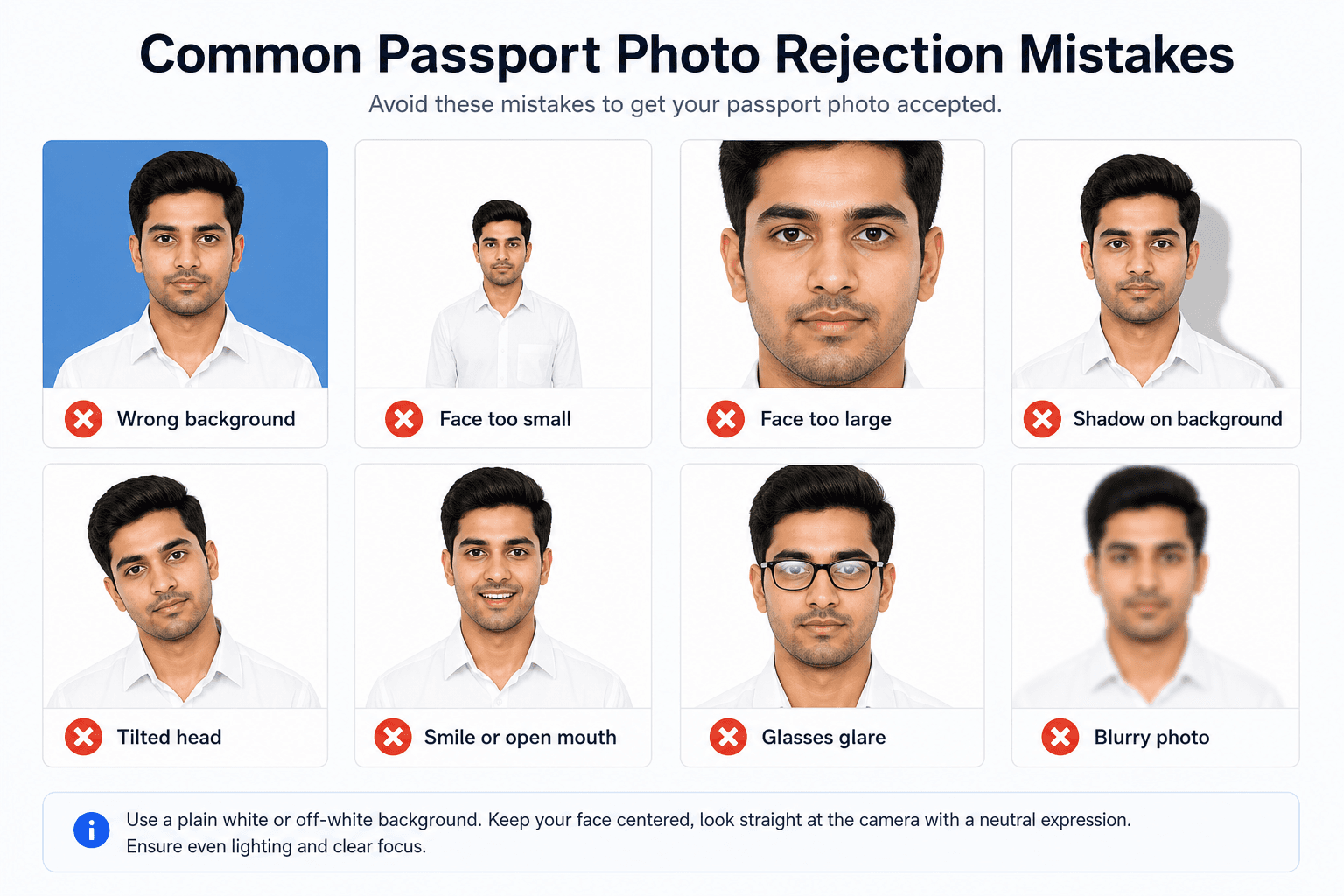
Wrong Background Color
Using colored, patterned, dirty, off-white, or shadowed backgrounds instead of pure white (#FFFFFF).
Fix: Use only pure white (#FFFFFF) background. Off-white is rejected by Passport Seva.
Incorrect Size
The photo is not exactly 35×45mm or the crop leaves the head too small or too large inside the frame.
Fix: Use a proper crop guide or sizing tool so the final image matches the required 35×45mm portrait format.
Poor Lighting
Shadows on the face, bright highlights, washed-out skin tones, or uneven light from one side make the image look unbalanced.
Fix: Use soft light from the front and check the preview before saving the final photo.
Wrong Expression
Smiling too much, laughing, frowning, or leaving the mouth open can make the photo fail a basic identity check.
Fix: Keep a neutral expression with a relaxed face and mouth closed.
Glasses Issues
Glare on lenses, tinted glasses, thick frames, or reflections covering the eyes can make the photo unreadable.
Fix: Remove glasses completely. Glasses are banned for Indian passport photos since 2020.
Face Not Centered
The head is tilted, looking sideways, or positioned too high or too low in the frame.
Fix: Look directly at the camera and center your face before taking the final shot.
Eyes Not Visible
Eyes are closed, squinting, hidden by hair, or partially covered by shadows.
Fix: Move hair away from the eyes, open both eyes naturally, and retake the photo if the frame hides them.
Old Photo
The photo is older than six months or no longer shows your current appearance clearly.
Fix: Take a fresh photo that matches your present hairstyle, face shape, and everyday look.
Wrong File Format
The upload uses the wrong file type or the file is too large or too small for the portal rules.
Fix: Export to the required format, usually JPEG, and keep the file size within the form limit.
Heavy Editing
Beauty filters, face reshaping, strong skin smoothing, or extreme color correction can make the image feel artificial.
Fix: Keep editing light, natural, and limited to crop, background cleanup, and basic brightness correction.
Bad Head Position
The chin is too high, the head is turned, or the posture makes the face look distorted.
Fix: Sit straight, keep your shoulders level, and make sure the camera is at a comfortable eye level.
Cluttered Clothing or Background
Busy patterns, bright colors, or objects behind you can distract from the face and create unnecessary rejection risk.
Fix: Wear simple clothing and use a plain background so the face remains the only focus.
Quick Self-Check Before You Upload
- Is the background plain, bright, and free from visible shadows?
- Are both eyes visible, open, and not blocked by hair or glasses glare?
- Is the face centered with a neutral expression and no tilt?
- Does the crop match the required 35×45mm portrait size?
- Is the file type and file size within the portal limit?
- Does the photo still look natural after any adjustment?
A Better Pre-Upload Routine
A good passport photo is usually the result of a small routine rather than a big edit. Take the photo, step away for a minute, and then review it with fresh eyes. When you come back, you will notice background noise, posture issues, and crop problems much faster.
If something looks off, change only one thing at a time. Fix the light first, then the background, then the crop. This keeps the image natural and prevents over-editing, which is often worse than the original problem.
- Retake the photo if the face looks tired, tilted, or too dark.
- Use the cleanest original version before adding any edits.
- Compare two final versions side by side and choose the one that looks simplest and most neutral.
- Save the accepted version separately so you can reuse the same style later.
How to Recover From a Bad Shot
If the first shot is not usable, do not try to rescue every flaw at once. Start by asking what actually caused the problem. If it is lighting, move the subject. If it is framing, recrop. If it is facial expression, take the photo again. A clear diagnosis makes the fix much faster.
- Retake immediately if the eyes are closed or the expression feels tense.
- Fix the background first if the wall is the main problem.
- Use only small edits when the image is already mostly correct.
- Keep the cleanest version so later copies stay consistent.
The fastest fix is often a fresh shot rather than a long edit session. If a photo needs too many corrections, it usually means it was easier to retake from the start.
FAQ
What are the most common passport photo rejections?
The biggest reasons are wrong background color, incorrect size, poor lighting, old photos, and visible glare on the eyes or glasses. These are easy to miss, so a final check matters a lot.
Can I retake if rejected?
Yes, you can usually submit a new photo, but it can slow down the application. A careful retake is faster than waiting for a rejection and resubmission cycle.
How to avoid shadows on face?
Use soft lighting from the front, move slightly away from the background, and preview the image before saving. If the shadow is strong on one side, retake the photo rather than trying to fix it later.
Are slight imperfections okay?
Small imperfections sometimes pass, but it is safer to remove avoidable issues before submission. Passport photos are simple, so a clean, balanced image is the best choice.
Will they reject for minor size differences?
They can. Even if the difference seems tiny on a phone screen, the actual print or upload can fall outside the acceptable range and fail automated checks.
Can I use an old photo if I look the same?
It is better not to. Most forms expect a recent image because the system wants the photo to reflect your current appearance, not a version from many months ago.
What should I check before uploading?
Check the background, eye visibility, crop, file size, lighting, and expression. If all of those are clean, the photo is much less likely to be rejected.
Is a studio photo always safer?
Not always. A good studio photo can work well, but a carefully prepared home photo can also meet the same requirements if it follows the size and background rules closely.
Can cropping fix every mistake?
No. Cropping helps with size and framing, but it cannot fully fix bad lighting, closed eyes, glare, or a distracting background. Some mistakes need a retake.
Should I edit the face if it looks dull?
Keep face edits minimal. A slight brightness or contrast change can help, but avoid filters, smoothing, or changes that make the image look unreal.