Indian Passport Photo Requirements
Practical checklist for current document photo preparation
Complete practical checklist for passport photos used in Indian government, embassy, and official document workflows. Follow these guidelines to reduce avoidable upload and print issues.
A compliant passport photo is usually less about style and more about consistency. If the size, background, expression, or crop is off, the application can be delayed even when the photo looks acceptable at first glance. This guide gives you the standard rules in one place so you can prepare a photo that feels clean, natural, and easy to submit.
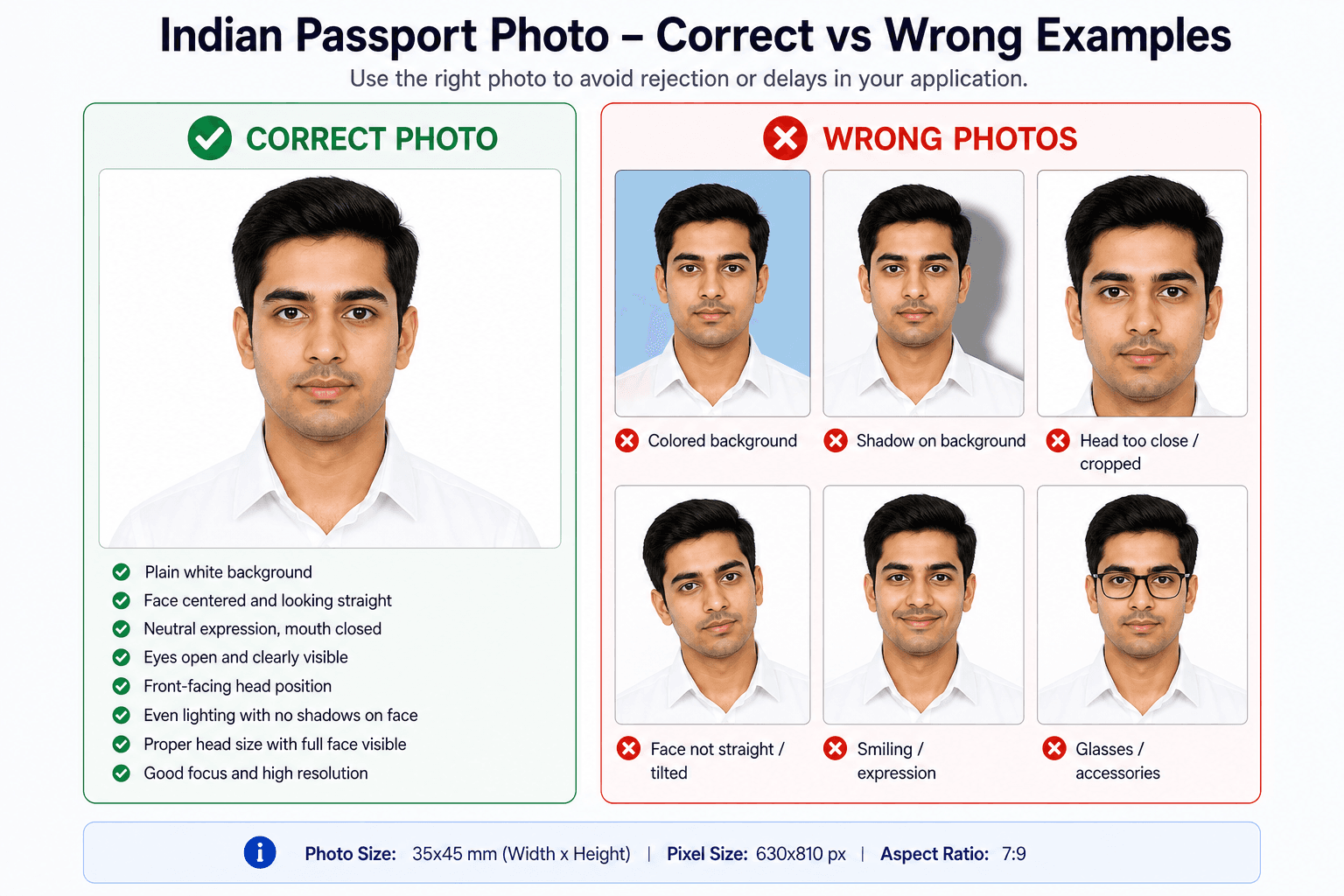
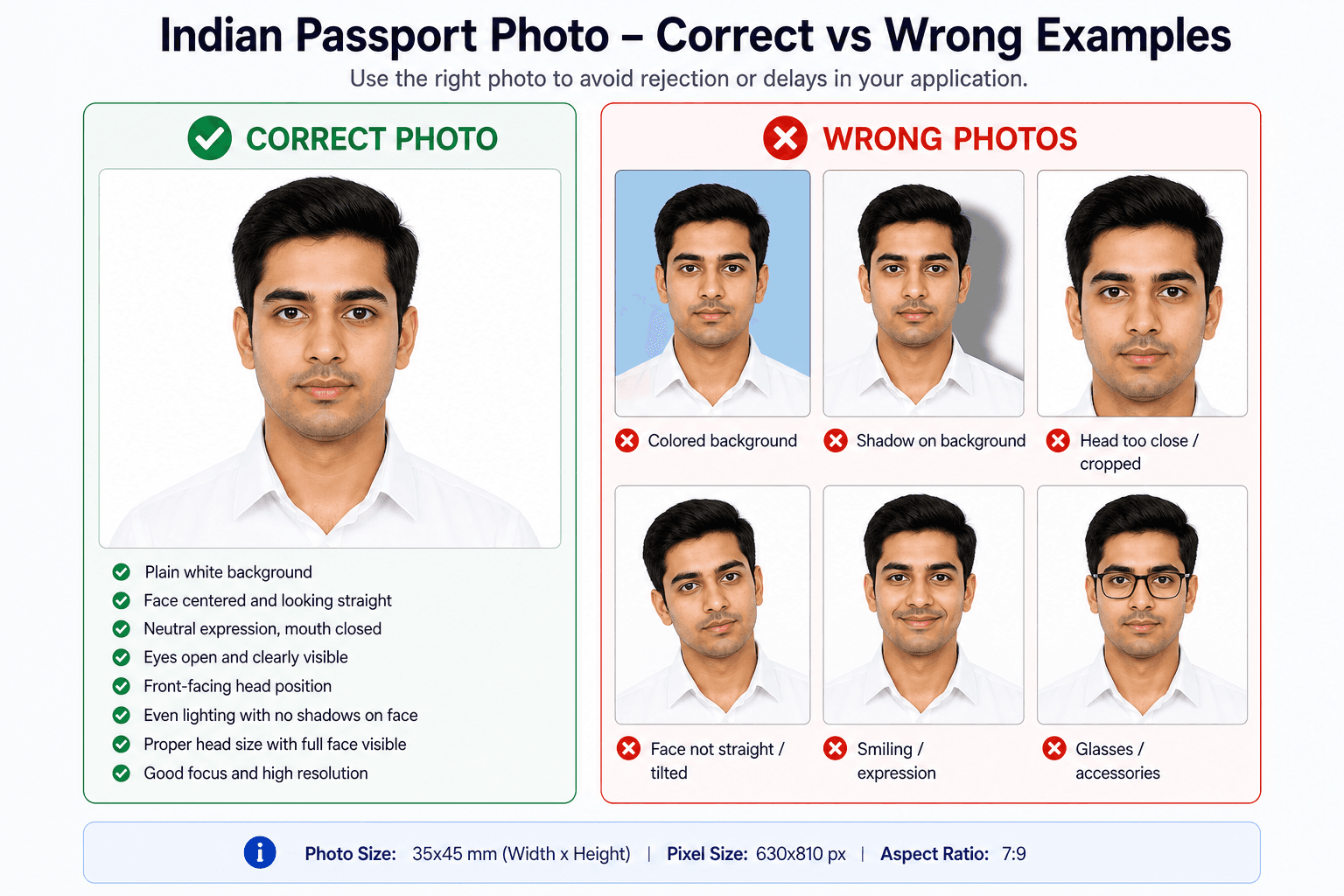
Visual checklist for common passport photo background, crop, lighting, and expression issues
Requirements snapshot
Start with size, background, face, and file quality
A strong passport photo is simple: correct 35x45mm crop, plain background, natural lighting, recent face, neutral expression, and a sharp file that stays within the upload limit. Avoid claiming a photo is accepted until the final portal or officer reviews it.
- Remove strong shadows from the face and wall.
- Avoid filters, face reshaping, and heavy skin smoothing.
- Check the target document before final submission because rules can vary.
Requirements can vary by form, portal, and country. Use this page as preparation guidance, then confirm the final instruction on the application form.
Related next steps
Quick Summary: Standard Requirements
Use this summary when you want a fast check before uploading, printing, or asking a photo studio to prepare the file for you. If any one of these basics is wrong, the photo can look fine to the eye but still fail the document rules.
The safest habit is to treat these values as final, not approximate. If the size and background are correct, the photo already feels much more trustworthy and much easier to reuse across forms. For competitive exams (like SSC, IBPS, and state PSCs) requiring candidate name and date printed on the image, use our specialized Passport Photo With Name and Date maker.
Detailed Specifications
These are the core rules most people need to remember. A valid passport photo should be portrait, evenly lit, and recent enough to reflect your current appearance. If you are taking the image at home, a plain wall and a steady camera position can make a big difference.
A simple setup is usually enough: step back, keep the phone level, and check that the lighting is even across the face. Small improvements in the source photo usually create a much cleaner final result.
| Specification | Requirement | Details |
|---|---|---|
| Photo Size | 35×45mm | 3.5cm × 4.5cm |
| Background Color | Pure white (#FFFFFF) | Plain, no patterns or shadows |
| Face Position | Centered | Face should occupy 80–85% of frame |
| Head Position | Straight | Looking directly at camera |
| Expression | Neutral | Mouth closed, no smile |
| Eyes | Open and Visible | No squinting, clearly visible |
| Glasses | Not Allowed | Banned for Indian passport photos since 2020 |
| Head Covering | Religious Only | Face must be fully visible |
| Resolution | 630×810 pixels | For print quality |
| Digital File Size | 10 KB - 250 KB | For Passport Seva online applications |
| Photo Age | Within 6 months | Must represent current appearance |
Requirements by Document Type
Not every form asks for the same crop or background, which is why this table is helpful when you are preparing photos for more than one document at the same time. Passport, Aadhaar, PAN card, and visa use cases may overlap, but the fine print still matters.
If you are creating a photo for a studio, tell them the exact document name and size together. That small detail reduces the chance of getting a near-match that looks acceptable but fails the checklist.
| Document | Size | Background | Notes |
|---|---|---|---|
| Indian Passport | 35×45mm | Pure White (#FFFFFF) | Matte or semi-matte finish |
| Aadhaar Card | 35×45mm | White | Color or B&W accepted |
| PAN Card | 35×45mm | White | Recent photo required |
| Driving License | 35×45mm | White | State variations may apply |
| Voter ID | 35×45mm | White | Clear face visibility |
| US Visa | 2×2 inches (2×2 inch square) | White | No glasses allowed |
| UK Visa | 45×35mm | White/Light Gray | Biometric standards |
| Schengen Visa | 35×45mm | White/Light Gray | Face 80–85% of photo |
| Canada Visa | 50×70mm | White | Largest size requirement |
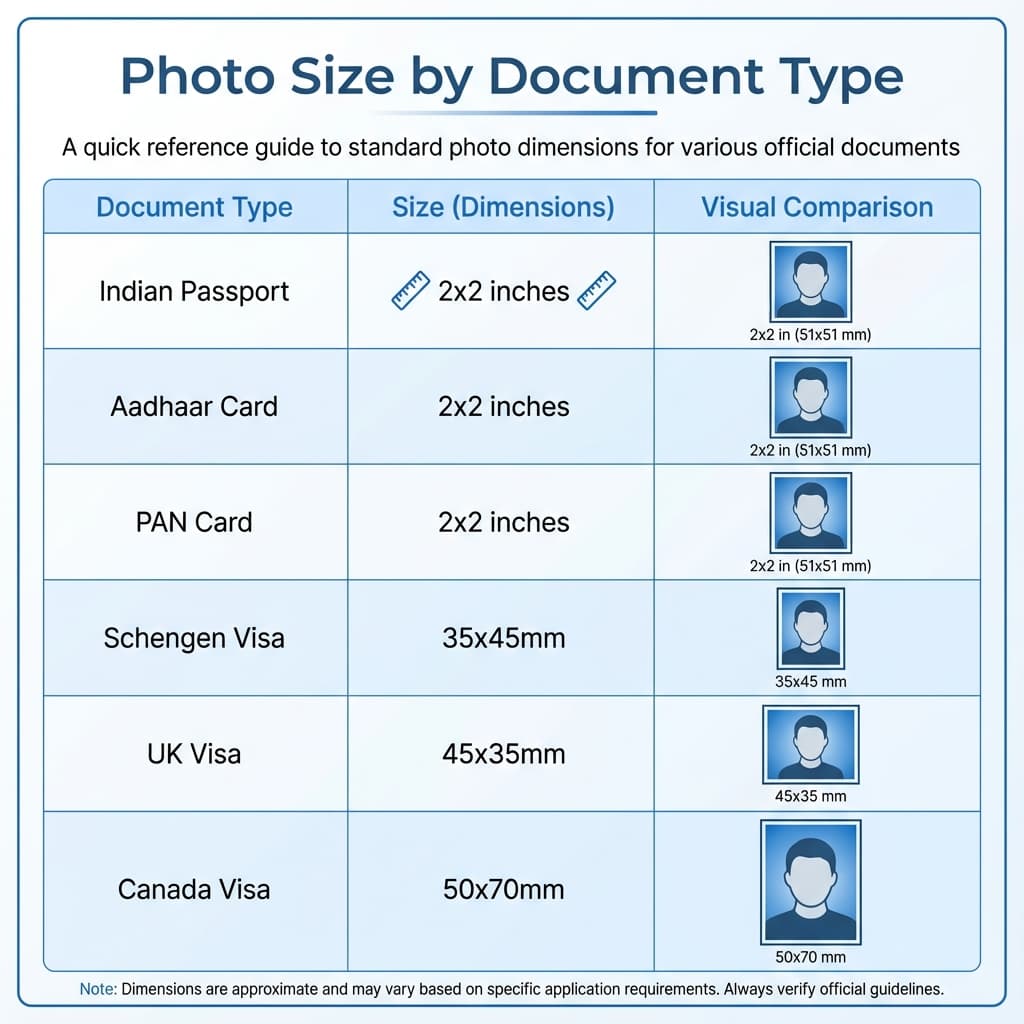
Visual comparison of photo sizes for different documents
If you are deciding between two sizes, the safer choice is always the exact document standard rather than a near match. Even small differences in width, height, or crop position can make the photo feel correct visually while still being technically wrong.
The same idea applies to printing and uploading. A photo that is precise from the start usually saves you from a second round of edits, and that is especially useful when deadlines are tight.
Do's and Don'ts
This is the easiest section to follow if you want a clean, submission-ready photo. The best results usually come from simple lighting, a plain background, and a neutral expression that does not force the face into an unnatural look.
DO'S
- Use only pure white (#FFFFFF) background
- Maintain neutral expression with mouth closed
- Ensure even lighting without shadows
- Look directly at the camera
- Keep both eyes open and visible
- Use recent photo (within 6 months)
- Center face properly in frame
DON'TS
- Don't use colored or patterned backgrounds
- Don't smile, laugh, or make expressions
- Don't wear sunglasses or tinted glasses
- Don't use old or outdated photos
- Don't apply beauty filters or heavy editing
- Don't cover face with hair or accessories
- Don't tilt head or look away from camera
A natural photo is usually the strongest one. If the image looks like a normal, recent picture of you, with no obvious editing tricks, it tends to feel more trustworthy and easier to review.
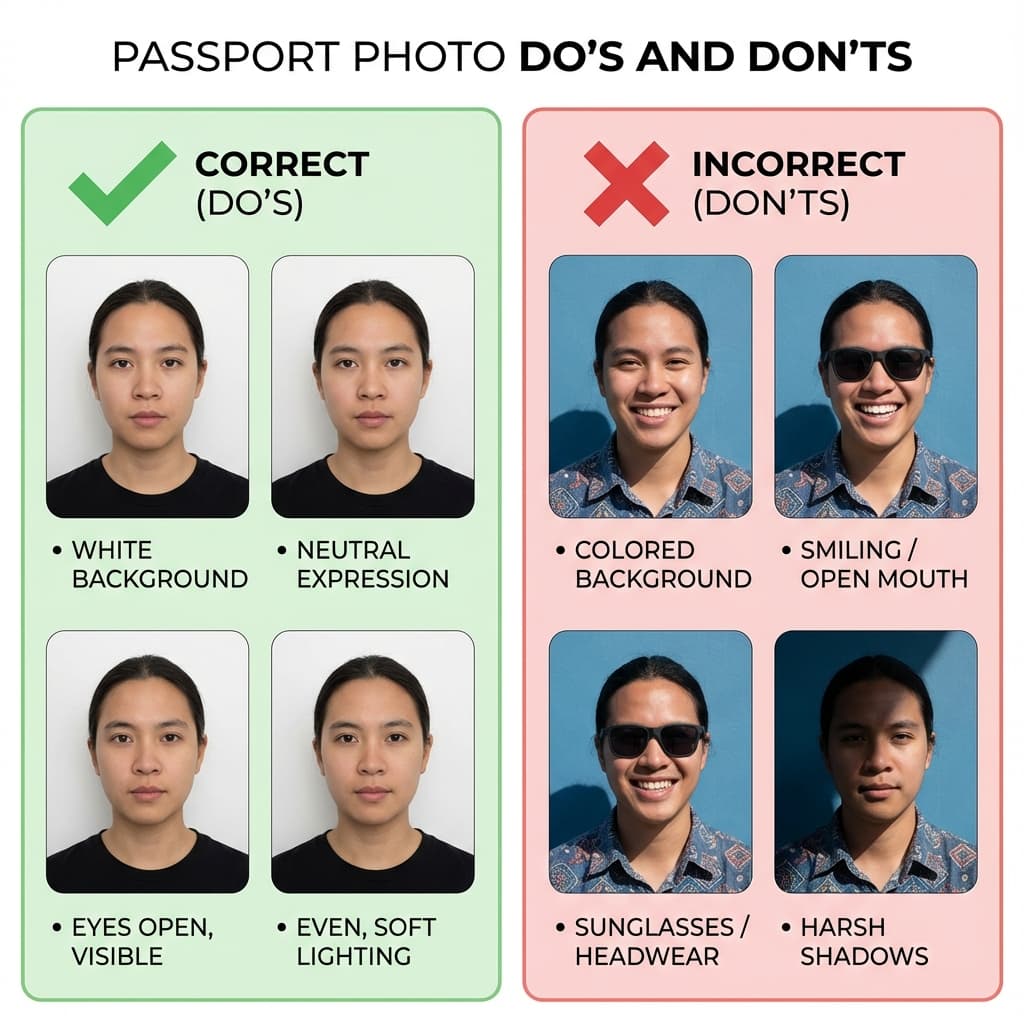
Visual guide: What to do and avoid for passport photos
Digital Photo Requirements
For online passport applications, e-visa forms, and digital submissions, your photo must meet these additional specifications:
A digital file should upload quickly, stay sharp after compression, and keep the face easy to read on a small screen. That is why format, file size, and pixel dimensions all need to work together rather than being treated as separate settings.
If the photo will be reused later, save the master version with a clear name and keep the cleanest copy you have. That makes it much easier to prepare the same image for another form without rebuilding it.
If your portal gives a smaller size limit than expected, reduce compression only as much as needed to pass the upload while keeping the face clean and the background smooth.
The goal is not simply to make the file smaller. The goal is to keep the face clear enough that the portal can read it easily and the photo still looks like a real document image.
Frequently Asked Questions
What is the exact size of Indian passport photo?
The standard Indian passport photo size used throughout this guide is 35×45mm. This is also written as 3.5×4.5cm or about 1.38×1.77 inches.
What background color is required?
Use a plain white or very light background unless your specific form says otherwise. Avoid patterns, shadows, dirty walls, and strong color casts.
Can I wear glasses in passport photo?
Yes, prescription glasses are allowed but must be non-tinted and without glare. Sunglasses are not permitted.
How recent should the photo be?
Photos must be taken within the last 6 months and should represent your current appearance.
What expression should I have?
Neutral expression with mouth closed. No smiling, laughing, or frowning.
Can I wear religious head covering?
Yes, religious head coverings are allowed but your full face must be visible from chin to forehead.
What is the minimum resolution for digital photos?
Minimum 300 DPI for print quality. For online applications, 630×810 pixels dimensions with 10KB–250KB file size.
Are selfies acceptable for passport photos?
Selfies can work if taken with good lighting, white background, and proper framing. Use rear camera for better quality.
Can I edit or filter my passport photo?
Light editing for brightness/contrast is acceptable. Beauty filters, face alterations, or heavy editing is not allowed.
What should I wear for passport photo?
Wear normal clothing that contrasts with white background. Avoid white tops. Religious or cultural dress is acceptable.
How many photos do I need for passport application?
2 photos for fresh passport, 2 photos for renewal. We recommend keeping 4-6 as backup.
Is the size same for all Indian documents?
Most Indian government documents use 35×45mm size. Some visa applications require different sizes (for example, Schengen also uses 35×45mm while others vary).
Can babies and children use the same specifications?
Yes, same size applies. For infants, eyes must be open and support (like parent hand) should not be visible.
What if my photo gets rejected?
Common rejections are due to wrong background, poor lighting, or incorrect size. Using our tool minimizes rejection chances.
Are colored photos required or black & white?
Colored photos are required for passport. Some older documents may accept B&W but colored is always preferred.
Create Your Compliant Passport Photo Now
Our free tool automatically ensures your photo meets all these specifications.
Create Free Passport Photo →