US Visa Photo Requirements for Indians
Everything you need to know about DS-160 photo requirements, size specifications, and practical checks before uploading.
Quick Overview
US visa photos are simple on paper, but the details matter. The system checks for a square image, a white background, a neutral expression, and no glasses in almost every case. That means a photo that looks “fine” to the eye can still fail a DS-160 upload if the file size, crop, or framing is off.
If you are applying from India, remember that US visa size stays 2x2 inches while Indian passport size is now 35×45mm. The digital rules are also specific, so it is worth treating the upload as its own task rather than assuming another document photo will work as is.
Fast Rule of Thumb
White background, no glasses, square format, and recent photo. If you remember only those four points, you already avoid most rejection issues.
Photo Specifications
The US visa photo requirements are straightforward but must be followed exactly. Here are the complete specifications:
The reason these rules are strict is that US visa systems use automated checks before the photo reaches the interview stage. A small change in framing or a reflection on the lenses can trigger a failure even when the photo looks acceptable to a person.
| Size | 2 x 2 inches (51 x 51 mm) |
| Background | Plain white only |
| Head Size | 25-35mm (1 to 1⅜ inches) |
| Eye Position | 28-35mm from bottom of photo |
| Expression | Neutral, mouth closed |
| Glasses | NOT ALLOWED |
| Photo Age | Within 6 months |
| Color | Full color |
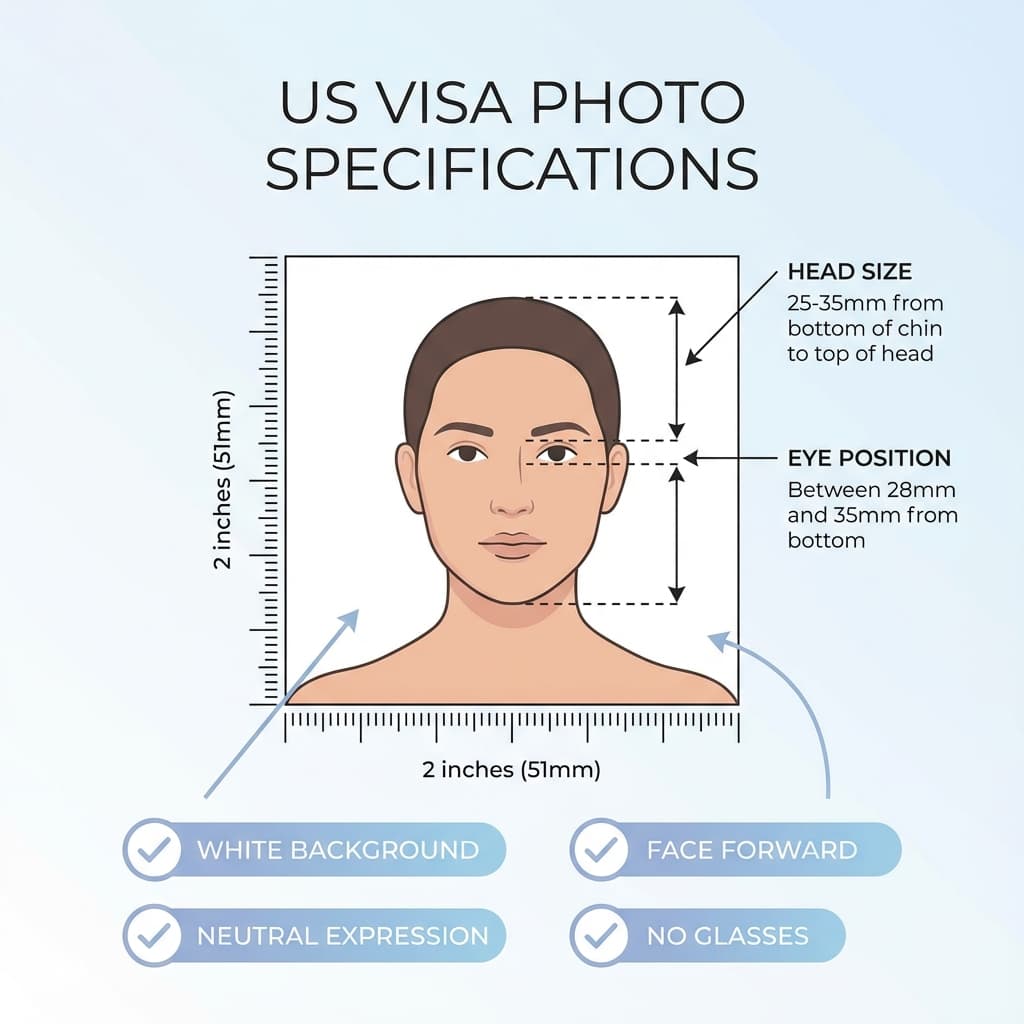
The head should be centered, the shoulders should be visible, and the face should occupy most of the frame without touching the edges. If you are taking the photo at home, stand a little farther from the wall so the background stays clean and shadows remain soft.
Digital Photo for DS-160
When applying online through the DS-160 form, you must upload a digital photo. These are the exact requirements:
- Format: JPEG (.jpg) only
- Dimensions: Between 600x600 to 1200x1200 pixels
- File Size: Maximum 240 KB
- Color Space: 24-bit sRGB color
- Compression: Avoid heavy compression that reduces quality
- Aspect Ratio: Must be square (1:1)
In practice, the best upload is usually a clean JPEG that is sharp, well lit, and not over-edited. If the file is too small, it may look soft. If it is too large, the portal may refuse it. The sweet spot is a balanced export that keeps the face crisp without bloating the file.
Pro Tip
Use PassportSizePhoto.in to convert your photo to the correct square format, then compress it if the DS-160 upload limit requires it.
If you are resizing manually, keep the face readable after the crop. A common mistake is to reduce the dimensions too aggressively, which makes the image pass the upload check but look weak once the embassy reviews it.
No Glasses Rule
Important: No Glasses Allowed
Since November 2016, the US State Department prohibits wearing glasses in visa photos. This applies to all types of glasses including prescription glasses. The only exception is for applicants with documented medical necessity who cannot remove their glasses.
If you normally wear glasses, you must remove them for your US visa photo. This rule exists because:
- Glasses can cause glare and reflections
- Frames may obscure parts of the eyes
- Tinted lenses can hide eye color
- Glasses interfere with facial recognition systems
Contact lenses are usually fine if they do not change the natural look of your eyes, but the safest route is always to keep the photo simple. If you have to choose between a technically perfect glasses-free photo and a stylish one with glare, always choose the first option.
Interview Day Photo
Even though you upload a digital photo with your DS-160 application, you should carry 2 printed photos to your visa interview at the US Embassy or Consulate.
Embassy staff may request a printed copy even if the online upload was accepted. Keeping two fresh prints in a protective envelope is a simple way to avoid last-minute scrambling.
The printed photos must meet the same specifications:
- 2x2 inch size
- White background
- No glasses
- Neutral expression
- Recent (within 6 months)
If your interview is scheduled much later than your application, check the date again before you travel. A photo that was acceptable at filing time is still expected to match your current appearance when you show up in person.
Same as Indian Passport?
Not anymore. The US visa photo uses 2x2 inch size, while Indian passport uses 35×45mm. If your photo is:
- Recent (taken within 6 months)
- Without glasses
- With white background
...then it can work for your US visa application. If your photo was prepared for Indian passport at 35×45mm, you'll need a US-specific 2x2 version.
Do not assume one file fits both. Indian passport and US visa now use different dimensions, and the US process is stricter about glasses and digital upload behavior.
Tips for Success
The easiest way to reduce DS-160 photo problems is to make the photo look simple and deliberate. Avoid busy backgrounds, overexposed skin, and awkward cropping that makes the head sit too low or too high in the frame.
- Remove glasses completely - No exceptions unless medically necessary
- Pure white background - No cream, grey, or off-white
- Recent photo - Must be taken within last 6 months
- Neutral expression - Mouth closed, no smiling
- Face centered - Eyes should be roughly in the middle
- Good lighting - Even lighting, no shadows on face
- Hair away from face - Both eyes must be clearly visible
- Use a simple shirt - Avoid patterns that blend into the background
For many applicants, a phone photo taken near a plain wall is enough if the light is even and the camera is held at eye level. What matters most is control over the final crop and a file that stays sharp after export.
Photo Upload Issues
If the DS-160 form rejects your photo, check these common issues:
- "File too large" - Reduce file size to under 240 KB
- "Wrong dimensions" - Ensure photo is square (600x600 minimum)
- "Invalid format" - Must be JPEG, not PNG or other formats
- "Photo rejected" - Check background is pure white
If issues persist, try uploading from a different browser or device.
If the browser still complains, open the photo in a simple editor and re-save it as a fresh JPEG. That often removes metadata or odd compression artifacts that can confuse upload forms. A small clean re-export is usually better than heavy editing.
Common Mistakes to Avoid
A lot of DS-160 problems come from treating the photo like a casual upload instead of a formal identity image. If you avoid the mistakes below, the process becomes much smoother.
- Over-editing: Skin smoothing, filters, or background replacement can make the photo look artificial.
- Wrong crop: The top of the head or the chin should not be cut off.
- Mixed lighting: Warm and cool light in the same image can create strange color balance.
- Too much compression: Small files are fine, but not if detail disappears.
If you are unsure, compare the upload version with the print version side by side. They should both look clean and nearly identical in framing, even if one is smaller in file size.
Frequently Asked Questions
What size photo is needed for US visa?
2x2 inches (2×2 inch square). US visa uses square format, unlike the current Indian passport 35×45mm format.
Can I wear glasses in US visa photo?
No. Since November 2016, glasses are not allowed in US visa photos except for documented medical necessity.
What is the digital photo size for DS-160?
Minimum 600x600 pixels, maximum 1200x1200 pixels. File size must be under 240 KB in JPEG format.
How recent should my US visa photo be?
Photo must be taken within the last 6 months and represent your current appearance.
Can I smile in US visa photo?
No. You must have a neutral expression with mouth closed.
Is US visa photo same as passport photo?
No for Indian passport applications. US visa uses 2x2 inches (2×2 inch square), while Indian passport now uses 35×45mm.
What if my face is too close or too far from the frame?
Re-crop the image so the head sits in the middle of the frame and the face occupies the correct amount of space without touching the edges. The safest upload is balanced, not extreme.
Can I reuse an old passport photo for DS-160?
Only if it is recent and still matches your current appearance. If your look has changed, it is better to take a fresh photo than risk a mismatch at the interview.
Next practical step
After reading the guide, open the matching tool or reference page so capture, crop, upload, and print prep stay in the right order.
Create Your Passport Photo
Make a 35x45mm photo, download a digital file, or create a print-ready sheet.
Create Photo Free →