UK Visa Photo Requirements for Indians
All specifications for UK visa photos including size, background, and digital requirements for successful applications.
Quick Overview
UK visa photos use a portrait format that is different from Indian passport photos. The image should look like a proper identity photo rather than a casual portrait: straight to camera, even lighting, and a neutral expression.
If you already have a passport photo, do not assume it will work unchanged. The UK format is 45x35mm, so the crop has to be rebuilt with the head positioned correctly inside a taller frame.
Key Difference
UK visa photos are 45x35mm, so they are not interchangeable with 2×2 inch square Indian passport photos. The same face can work, but the crop must be rebuilt correctly.
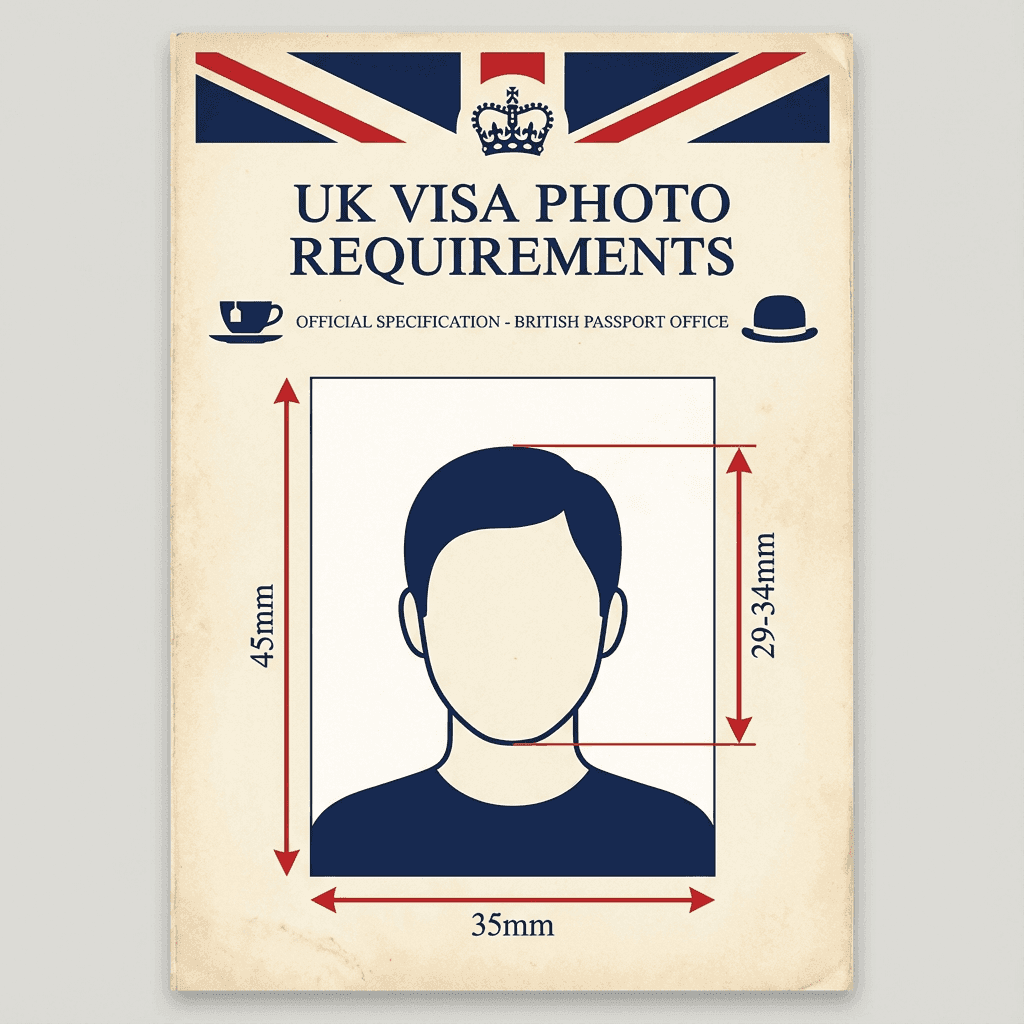
Photo Specifications
The UK application wants a clean portrait with the face placed in a specific range. The image should be bright enough to show natural skin tone and eye detail, but not so bright that the background loses contrast.
| Size | 45mm × 35mm (height × width) |
| Background | White or light grey/cream |
| Head Size | 29-34mm from chin to crown |
| Expression | Neutral, mouth closed |
| Glasses | Allowed (no glare) |
| Photo Age | Within 6 months |
UK vs Indian Passport Size
UK visa photos (45×35mm) are different from Indian passport photos (2×2 inch square). You cannot use the same photo for both.
If you are unsure about the crop, keep a little more space around the head rather than cutting too close. The face should still dominate the frame, but the edges should not feel crowded or accidental.
Digital Requirements
Digital photos for UK visa applications should be crisp, correctly sized, and saved in a standard format. The goal is to make the file easy for the system to read while preserving enough detail for a clear identity check.
- Format: JPEG
- File Size: 50 KB - 10 MB
- Dimensions: At least 600 × 750 pixels
- Color Depth: 24-bit
If the file is too compressed, facial edges can look soft and the image may appear muddy on upload. If it is too large, the system may slow down or reject it, so it is better to export a balanced file than to chase the highest possible resolution.
Do's and Don'ts
The UK visa process is one of those places where “natural” is the safest aesthetic. The more your photo looks like a straightforward identity image, the easier it is to keep the focus on the application rather than on the photo itself.
Do
- ✅ Face the camera directly
- ✅ Keep neutral expression
- ✅ Use plain white/light grey background
- ✅ Ensure even lighting
- ✅ Keep hair away from the eyes
- ✅ Check that the full face is visible
Don't
- ❌ Smile or have expressions
- ❌ Wear sunglasses
- ❌ Use old photos (over 6 months)
- ❌ Have shadows on face or background
- ❌ Use a photo that is too dark or too warm in color
- ❌ Crop the chin or crown too tightly
Prescription glasses can be allowed if they do not create glare, but if you want the least risky upload, a glasses-free photo is still the safer choice. Simple lighting and a plain background solve more rejection problems than any amount of editing.
Practical Shortcut
You can create the photo at home with a phone and then format it for print or upload at PassportSizePhoto.in. That keeps the crop in your control and avoids paying a studio to do basic resizing.
Pre-Print Checklist
Before you send the file to a print shop or upload it to a visa portal, run through a quick checklist. This is the easiest way to catch small issues without reopening the whole editing process.
- Confirm the ratio: The final image should be 45x35mm, not square.
- Check the background: It should be plain and consistent from edge to edge.
- Review the lighting: No strong shadow should sit under the chin or behind the head.
- Inspect the eyes: They must be open, clear, and easy to see.
- Save a backup file: Keep one copy for print and one for upload.
If the original photo came from your phone, export it once at the correct size and avoid re-saving it again and again. Repeated saves are one of the easiest ways to soften a photo that started out perfectly usable.
A good final check is to hold the image at arm's length and ask whether it still feels like a simple identity photo. If it starts looking styled or artistic, you have probably edited it more than the application needs.
If you are printing the file yourself, ask the shop to keep the cut exact and avoid any automatic border or scaling settings. A correct crop is more important than saving a few minutes at the printer.
Frequently Asked Questions
What size photo is required for UK visa?
45mm x 35mm (height × width). This is different from Indian passport which is 2×2 inch square. Photos should be in color on plain white or light grey background.
Can I wear glasses in UK visa photo?
Yes, clear prescription glasses are allowed. However, remove them if they cause glare or obscure your eyes. Sunglasses are never allowed.
What background color for UK visa photo?
Plain white or light grey/cream background. Avoid pure white if it matches your clothing as this reduces contrast.
What are UK visa digital photo requirements?
JPEG format, 50KB-10MB file size, at least 600×750 pixels, 24-bit color depth. Photo must be clear and in focus.
How recent must my UK visa photo be?
The photo must be taken within the last 6 months and accurately represent your current appearance.
Can I use my Indian passport photo for UK visa?
No, UK visa requires 45×35mm while Indian passport uses 2×2 inch square. You need a separate photo in the correct UK dimensions.
What expression should I have in UK visa photo?
Neutral expression with mouth closed. No smiling or frowning. Eyes must be open and looking directly at the camera.
Can I wear religious headwear in UK visa photo?
Yes, religious head coverings are permitted. However, your full face from forehead to chin must be clearly visible.
What if my UK visa photo gets rejected?
Common rejection reasons include wrong size, shadows, wrong background, or glasses with glare. You will need to submit a new compliant photo.
How many photos do I need for UK visa application?
Typically 2 identical photos are required for UK visa applications. Check your specific application requirements as this may vary.
Should I print the UK visa photo on glossy paper?
Photo-quality paper is preferred because it keeps the image clear and professional. The key is clean print quality, not a decorative finish.
Can I use a filtered phone image for UK visa?
No. Filters, beauty effects, or background filters can make the image look unnatural and can cause rejection. Keep the photo plain and unedited.
What if my face is slightly turned in the photo?
Retake it if possible. The safest submission is straight on, because even a small turn can make the image feel less compliant to reviewers.
Is a cream background acceptable for UK visa photos?
Yes, a light cream or light grey background is usually acceptable if it remains plain and evenly lit. Avoid anything that looks patterned, yellow, or too close to your shirt color.
Can I use my Indian passport photo for the UK application?
Only if it has been reformatted to the correct 45x35mm UK size and still meets the background and appearance rules. The original square crop by itself is not enough.
How many copies should I print?
Two is usually the minimum, but keeping one or two extras is smart. Extra copies are useful if a print gets bent, marked, or needed for another submission step.
What is the safest lighting setup at home?
Soft daylight near a window is often the easiest option. If you use artificial light, keep it even on both sides of the face and avoid strong shadows behind you.
Can I wear contact lenses in the photo?
Yes, as long as they do not alter the natural look of the eyes. The photo should still look like you on a normal day, with no dramatic changes in eye color or appearance.
Should I print on regular paper or photo paper?
Photo paper is the better choice because it keeps the image crisp and less likely to fade or smudge. Regular paper can make the photo look flat and less professional.
Can I reuse a UK photo for Schengen travel?
Only if the size and framing still match the Schengen instructions and the photo is recent. Since both use 35x45mm, the same source image can often work with the right crop.
What if the background is off-white instead of pure white?
A light cream or very pale grey background is usually okay if it remains uniform. The safest test is whether the background looks clean enough that it does not compete with your face.
How far should I stand from the camera?
Far enough to keep the face natural and proportional, then crop to the correct frame afterward. If you stand too close, the face can distort; too far, and the photo may look tiny.
Can I edit the brightness a little?
Yes, small exposure adjustments are fine if they make the face clearer without changing the natural look. Avoid dramatic edits that create washed-out skin or a fake-looking background.
What should I do if my photo keeps getting rejected?
Restart from the original image and simplify the workflow: straight pose, plain background, even light, then one clean export. Repeated fixes often help less than one careful retake.
Next practical step
After reading the guide, open the matching tool or reference page so capture, crop, upload, and print prep stay in the right order.
Create Your Passport Photo
Make a 35x45mm photo, download a digital file, or create a print-ready sheet.
Create Photo Free →