Passport Photo Background Color Requirements
Complete guide to background specifications for passport and other government photos. Plain whiteis the safest choice because it keeps the photo neutral, readable, and easy to accept.
Background intent
A plain light background beats a busy one
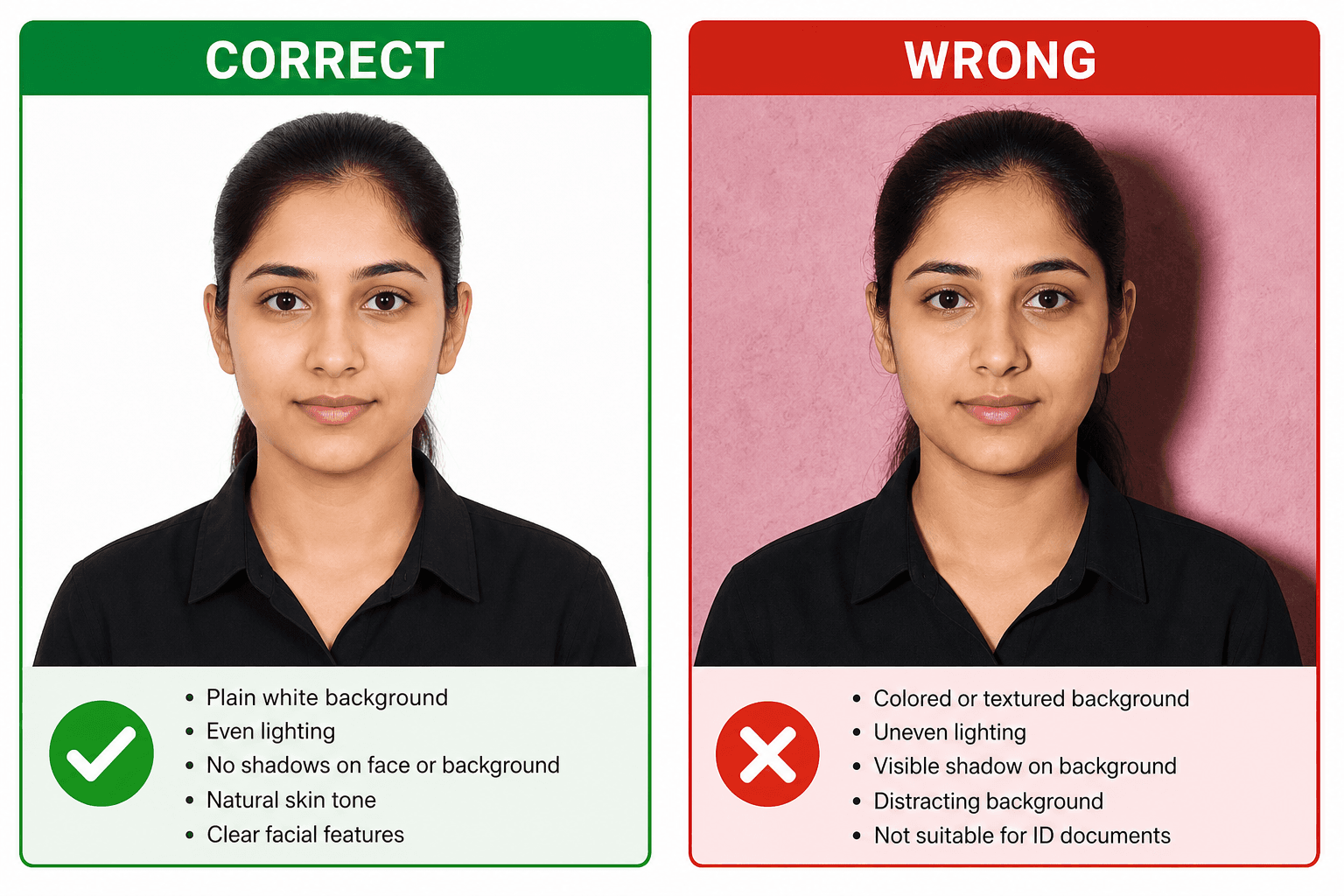
Use a plain white or light background with no shadows, patterns, objects, or color cast. If the wall has texture or uneven light, fix the source photo or use the white-background tool before resizing.
- Stand away from the wall to reduce shadows.
- Use front-facing soft light instead of side light.
- Avoid white clothing on a white background.
Related next steps
Background Requirements
The background matters because it helps automated systems and human reviewers separate the face from the surroundings. A clean, even backdrop also keeps the photo looking professional on printed forms and digital uploads.
Do's and Don'ts
Correct Background
- Plain white or off-white
- Uniform lighting
- No shadows
- Clean, no marks
- Smooth surface without texture
- Bright but not overexposed
Incorrect Background
- Colored backgrounds
- Patterns or textures
- Shadows behind head
- Visible objects
- Uneven wall paint or stains
- Harsh flash reflection
Why the Background Matters So Much
A passport photo is not judged only on the face. The background is checked because it affects how clearly the subject stands out and how easy it is to verify the image. If the background is cluttered, shadowed, or tinted, the photo can look distracting even when the face itself is sharp.
White works best because it creates a simple, neutral frame around the head and shoulders. That helps the photo feel balanced on a form, helps digital tools detect the head position, and reduces the chance that the image will look inconsistent across prints, uploads, or scanned copies.
How to Create White Background at Home
- 1
Find a white wall or use white sheet
Plain white wall, bedsheet, or poster paper works well. The surface should be smooth and free from bright patterns or folds that can cast texture into the photo.
- 2
Position yourself 1-2 feet away
Distance helps avoid shadows casting on background. If you stand too close, the wall can pick up a dark halo behind your head or shoulders.
- 3
Use natural lighting
Face a window for even lighting, avoid direct sunlight, and check that both sides of the face receive similar brightness.
- 4
Take a test shot and inspect the edges
Look for shadows near the hairline, neck, or shoulders. A quick test image can save time before you take the final photo.
- 5
Adjust the background only if needed
If the wall is slightly off-white, make a small correction instead of over-editing. The goal is a realistic clean backdrop, not a cutout look.
Common Background Problems and Fixes
Yellow cast from indoor light
Move closer to daylight or use a neutral LED light so the white background does not pick up a warm tint. A small color cast can make the photo look less official and more like a casual snapshot.
Dark shadow behind the head
Step farther from the wall and soften the light source. The shadow usually disappears when the subject is not pressed against the background.
Background is slightly gray
A faint gray tone is better than a busy background, but white is still the target. If you edit it, keep the tone even across the full frame.
Paper texture shows through
Use a smoother sheet or wall. Crinkles and texture become more visible in high-contrast photos and can make the image look less polished.
How to Check the Background Before You Submit
A quick review before upload can prevent the most annoying type of rejection: the one caused by something you could have spotted in ten seconds. Zoom into the image, check the shoulders, and look at the corners of the frame instead of focusing only on the face.
- Confirm that the white area stays even from top to bottom.
- Check for dark marks behind the ears, neck, or shoulders.
- Make sure no furniture, wires, or other objects peek into the frame.
- Compare the background to the shirt and skin tone to make sure nothing looks tinted.
- Save a backup copy before editing again so you do not lose the clean original shot.
If the background is already clean, keep the edit minimal. The best passport photos usually look simple rather than dramatic, and a gentle correction is better than a heavy filter or obvious cutout effect.
Background Setups That Usually Work Best
You do not need a studio to get a correct background. A few everyday setups work surprisingly well if the lighting is soft and the subject stands a little away from the wall. The goal is not a perfect photo shoot look, but a clean background that looks consistent in both print and digital form.
- A plain painted wall with daylight from a nearby window.
- A white sheet stretched flat so the folds do not create visible texture.
- Clean poster paper or foam board if you need a temporary background.
- A lightly edited background where the correction is even and subtle.
If you are unsure, choose the setup that looks most boring in the best way. Passport photos do not benefit from creativity in the background. They benefit from clarity, neutrality, and a consistent look from edge to edge.
FAQ
What background color for Indian passport photo?
Plain white is the safest choice for Indian passport photos. A very light off-white may sometimes look similar, but any visible pattern, color cast, or texture can create problems during verification.
Is light blue background acceptable?
Not for an Indian passport photo. Light blue is used for some visa categories in a few countries, but a passport photo should stay neutral and white unless the specific form says otherwise.
Can I use a photo with shadow on background?
No. Shadows behind the head or shoulders make the background look uneven and can cause the photo to be rejected. The full background should look clean and evenly lit.
What if my background is slightly gray?
If the background is only slightly gray, it may still be usable in some cases, but pure white is the better target. If you want the safest result, use a white wall or edit the background to white carefully.
How do I get a white background at home?
Use a plain white wall, a smooth white sheet, or clean poster paper. Stand far enough from the background to avoid shadows, and use soft light from the front so the background stays even.
Can background be removed digitally?
Yes, but the result should still look natural. Keep the edge of the hair and shoulders clean, avoid halos, and make sure the background looks flat and realistic rather than cut out harshly.
What about visa photos - same background?
Many visas also ask for a white background, but not every country uses the same rule. Always check the specific visa page, because some applications allow off-white or light gray.
Is glossy or matte background accepted?
That question is about paper finish, not color. The most important rule is the actual background color and lighting. White background is still the goal whether the print is glossy or matte.
How do I know the background is clean enough?
Look at the full frame, not just the wall behind your head. If you can see wrinkles, marks, uneven tone, or objects near the edge, it is better to retake or clean up the setup before submitting.
Can a slightly warm white background work?
A very light warm tone may still look acceptable in some cases, but a neutral white is safer because it avoids color cast issues and looks more official when printed or compressed.