Passport Photo Dimensions - Complete Measurement Guide
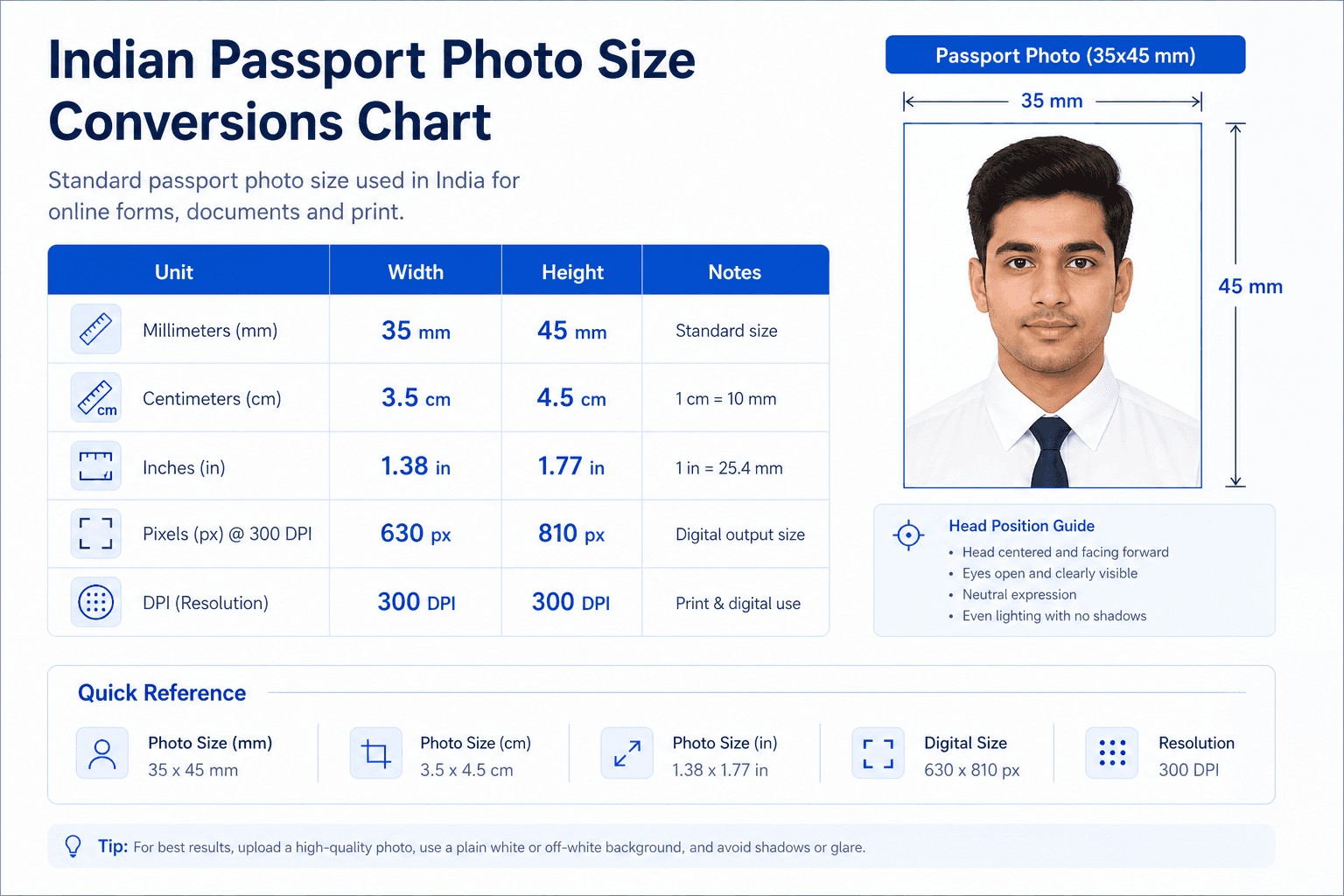
Indian passport photo size in all units: 35×45mm = 3.5×4.5cm = 1.38×1.77 inches = 630×810 pixels. Use this page to convert, compare, and measure without guessing.
Unit converter
Dimensions page should answer every unit fast
This page should stay as a converter/reference page, not be merged away. Its job is to answer mm, cm, inches, pixels, DPI, and aspect ratio quickly, then send users to the exact 35x45mm tool.
- Keep this page focused on measurements and conversion.
- Link prominently to the maker once the user has the answer.
- Avoid duplicating every requirement from the main guide.
Related next steps
Quick Reference
These values are not competing rules. They are four ways of describing the same final portrait image. If one unit is wrong, the others are usually wrong too, so it helps to check the full conversion together.
Why the Measurements Matter
Passport photos get rejected when the crop is off by a few millimeters or the pixels do not match the expected upload range. A photo can look fine on screen and still fail if the printed dimensions are too large, the face is too small, or the file becomes blurry after resizing.
The safest way to think about dimensions is to start with the final use. If you need a printed photo, focus on inches and millimeters. If you need an online upload, focus on pixels and file size. When both are right, the same photo can work across forms without looking stretched or cropped in a weird way.
Complete Dimension Table
| Unit | Width | Height | Notes |
|---|---|---|---|
| Inches | 1.38 | 1.77 | Indian passport standard |
| Centimeters | 3.5 | 4.5 | Metric equivalent |
| Millimeters | 35 | 45 | Precise metric |
| Pixels | 630 | 810 | Passport Seva upload format |
| Aspect Ratio | 0.78 | 1 | Portrait format |
Unit Conversions
For passport photo dimensions, these conversions are useful because they connect the common print and digital measurements to one simple target. If the crop is based on the wrong unit, the final result may look almost right but still fail a manual or automated check.
International Comparison
| Country | Size (mm) | Size (inches) | Ratio |
|---|---|---|---|
| India 🇮🇳 | 35 × 45 | 1.38 × 1.77 | 0.78:1 |
| USA 🇺🇸 | 51 × 51 | 2 × 2 | 1:1 |
| UK 🇬🇧 | 45 x 35 | 1.77 x 1.38 | 1.29:1 |
| Schengen 🇪🇺 | 35 x 45 | 1.38 x 1.77 | 0.78:1 |
| Canada 🇨🇦 | 50 × 70 | 1.97 × 2.76 | 0.71:1 |
The table shows why you should never assume all passport photos are the same. India now uses 35×45mm portrait format, while USA uses 2×2 square format. Many other countries use different ratios and head-position rules. If you travel often or apply for multiple visas, keep a separate size guide for each document type.
How to Measure the Photo Correctly
- 1
Check the crop area first
Make sure the face is centered and the portrait frame is not stretching the head. The top of the head and the shoulders should fit naturally inside the crop.
- 2
Use a ruler for printed photos
Measure both sides after printing. Do not trust the screen preview alone, because the final print can shift by a small amount depending on the printer settings.
- 3
Confirm the face size
The face should cover enough of the frame to look proportional, but not so much that hair or shoulders are cropped awkwardly. A centered portrait crop works best.
- 4
Check the file after resizing
When you export a digital file, zoom in once to make sure the image still looks sharp. A good size on paper can become blurry if the digital version is compressed too aggressively.
Before you finish, confirm that the output is 35×45mm portrait, the face is centered, and the image still looks natural at full size. If one of those three items is off, it is worth making one more adjustment.
When the Numbers Look Right but the Photo Still Fails
A photo can technically match the pixel or inch count and still be unusable if the face placement is off. For example, the size can be correct while the chin is too low, the hair touches the border, or the shoulders appear uneven because the crop was not centered well.
That is why the numerical size should always be checked together with the visual layout. Passport photos are not only about measurement. They are about consistency, clarity, and balance inside the frame.
- Keep the head straight and leave a sensible gap above the hair.
- Make sure the shoulders are even and the face is not squeezed to one side.
- Reopen the exported file and check that it is still sharp when zoomed in.
- If the photo is printed, measure the printed copy instead of only the digital preview.
Choosing the Right Output for the Right Use
The best output depends on where the photo will be used. A printed passport copy needs the final printed size to be accurate, while an online application needs the file to upload cleanly and keep the subject sharp after compression. The same source image can serve both purposes if you export it carefully.
FAQ
What is passport photo size in cm?
The standard passport photo size is 3.5 cm x 4.5 cm. That equals 35×45mm or 35 mm x 45 mm, so the measurements all describe the same portrait image.
What is passport photo size in mm?
The standard size is 35 mm x 45 mm. If your photo is a little larger or smaller, the crop may still be adjustable, but the final output should match the required size exactly.
What is passport photo size in pixels?
For print, 630 × 810 pixels at 300 DPI is a common target. For digital uploads, the exact pixel range depends on the form, but the image should remain sharp after compression.
Are inches and cm different sizes?
They are different units, but the physical size is the same. 35×45mm is equal to 3.5×4.5 cm and approximately 1.38 × 1.77 inches.
What DPI for passport photos?
300 DPI is the normal minimum for printing, and 600 DPI can be helpful if you want extra sharpness. DPI matters only when you are printing or preparing a scanned file.
What is aspect ratio of passport photo?
For Indian passport photos, the aspect ratio is 0.78:1 portrait. Some visa formats are rectangular, so you should always check the exact form before cropping.
How to measure passport photo?
Use a ruler or a crop guide and check both width and height. The final image should be exactly 35mm by 45mm or the metric equivalent after conversion.
Is 35x45mm same as 2×2 inch?
No. 35×45mm is a portrait rectangle, while 2×2 inch is a square format used for US visa and some other documents.
Do small rounding differences matter?
Small rounding differences are common when converting units, but the final photo should still match 35×45mm closely enough to remain compliant.
Can a 630×810 image still be wrong?
Yes. A 630×810 file can still fail if the face is cropped badly, the head is off-center, or the image becomes blurry after compression.