फ्री ऑनलाइन पासपोर्ट फोटो एडिटर

पासपोर्ट फोटो एडिटर — अपनी फोटो ऑनलाइन ठीक करें

फोटो पहले से है? उसे हमारे फ्री पासपोर्ट फोटो एडिटर में upload करें और किसी भी form के लिए ठीक करें: 35x45mm (3.5x4.5cm / 630x810px) crop, रंगीन background को सफेद बदलें, head size और margins सुधारें — फिर compliant JPEG या print-ready A4 sheet download करें।

फोटो अपलोड करें

JPG या PNG, अधिकतम 10MB

35x45mm crop
630x810px export
White background
A4 print sheet

साइनअप नहीं। आपकी फोटो सीधे एडिटर में खुलेगी।

स्मार्ट फोटो एडिटर स्टूडियो 2026

पासपोर्ट फोटो एडिटर स्टूडियो

अपनी फोटो अपलोड करें, 35x45mm व US Visa साइज़ बदलें, बैकग्राउंड स्वैप करें और तुरंत डाउनलोड करें।
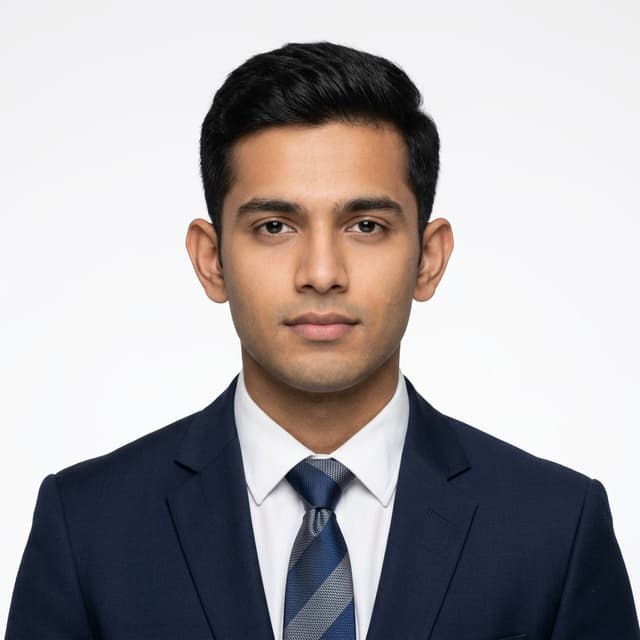
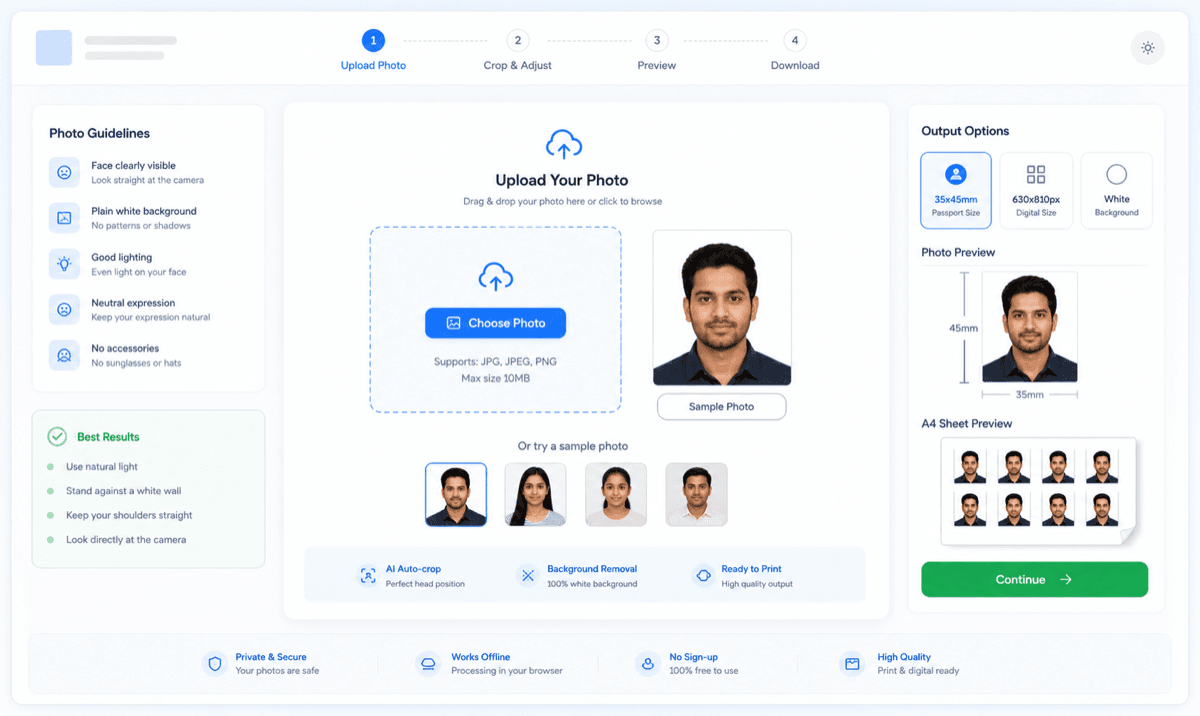
पासपोर्ट फोटो एडिटर
Real Passport photo editor preview canvas
↑ CROWN MARGIN
👁️ EYE LINE (3.5 : 4.5)
↓ CHIN & SHOULDER
Indian Passport (Adult): 35×45 mm
Passport Seva, MEA — Official Photo SpecificationsSpec GuideGovt Portal

1. पासपोर्ट व वीजा आकार

35x45mm crop और A4 sheet विकल्प दिखाता पासपोर्ट फोटो एडिटर अपलोड टूल

फोटो सीधे browser में ठीक करें

ज्यादातर passport photo rejection छोटी-छोटी गलतियों से होती हैं: crop थोड़ा गलत, background में shadow या रंग, या head size गलत। यह editor इन्हीं दिक्कतों को ठीक करने के लिए बना है — फोटो upload करें, सुधार लगाएं और official size specs वाली file download करें।

JPG / JPEG digital photo

Online Passport Seva-style uploads और forms के लिए 630x810px JPEG photo export करें।

PNG clean copy

Compression से पहले या document use के लिए high-quality PNG copy download करें।

आप क्या बना सकते हैं

Digital passport photo और print sheet दोनों के लिए editor इस्तेमाल करें। अपने form या local print shop के हिसाब से output चुनें।

JPG / JPEG digital photo

Online Passport Seva-style uploads और forms के लिए 630x810px JPEG photo export करें।

PNG clean copy

Compression से पहले या document use के लिए high-quality PNG copy download करें।

A4 या 4R print sheet

Home या shop printing के लिए cutting guides के साथ कई 35x45mm photos एक sheet पर बनाएं।

PDF-ready print workflow

अगर print shop PDF मांगे, तो generated sheet को system print dialog से 100% scale पर PDF/save/print करें।

35x45mm Output Size और 630x810px Digital Export

Edit के बाद आपकी फोटो official numbers पर होनी चाहिए: print के लिए 35mm x 45mm और digital upload के लिए 630x810px। Editor crop को इसी portrait ratio पर lock करता है, जिससे print और upload दोनों consistent रहते हैं।

Print size
35mm x 45mm
Centimeters
3.5cm x 4.5cm
Digital size
630px x 810px
Background
Plain white preferred
Face framing
Centered face, shoulders visible
File type
Portal upload के लिए JPEG; editor में PNG/WEBP भी उपलब्ध
630x810px डिजिटल आयामों के साथ भारतीय पासपोर्ट फोटो 35x45mm साइज डायग्राम
पासपोर्ट फोटो white background before and after preview

Background सफेद बदलें (और क्या नहीं बदलना चाहिए)

Editor रंगीन या shadowed background को साफ सफेद बदल सकता है। लेकिन सब कुछ नहीं: filters, heavy retouching, tilted head या cropped shoulders rejection reasons हैं जिन्हें कोई editor नहीं छिपाना चाहिए। Setup ठीक करें, चेहरा नहीं।

  • Recent photo use करें, ideally पिछले 6 months की।
  • Camera की तरफ सीधा देखें, eyes open और neutral expression रखें।
  • Background plain white या very light हो, pattern न हो।
  • Caps, sunglasses, beauty filters और heavy retouching avoid करें।

आपकी एडिट की गई फोटो की A4 Sheet

फोटो ठीक होने के बाद कई copies को cutting guides के साथ A4 या 4R paper पर arrange करें। सही size के लिए 100% scale पर print करें और fit-to-page बंद रखें।

Print tip: Printer dialog में scale 100% रखें। Fit to page, shrink to printable area, या borderless auto scaling बंद रखें।
कटिंग गाइड के साथ 35x45mm पासपोर्ट फोटो की A4 sheet preview

पासपोर्ट फोटो ऑनलाइन कैसे एडिट करें

1

अपनी मौजूदा फोटो upload करें

कोई भी recent JPG या PNG चलेगी — studio shot या घर की खिंची फोटो। आपके पीछे plain wall हो तो background cleanup आसान होता है।

2

Crop, head size और background ठीक करें

चेहरे को 35x45mm guide पर align करें, head-to-frame ratio सुधारें और जरूरत हो तो background साफ सफेद बदलें।

3

ठीक की गई फोटो या print sheet download करें

Online forms के लिए single compliant file export करें, या printing के लिए A4/4R sheet पर copies arrange करें।

Photo Requirements Checklist

  • Recent photo use करें, ideally पिछले 6 months की।
  • Camera की तरफ सीधा देखें, eyes open और neutral expression रखें।
  • Background plain white या very light हो, pattern न हो।
  • Caps, sunglasses, beauty filters और heavy retouching avoid करें।
  • Crop से पहले full head और shoulders visible रखें।
  • Final submission से पहले official portal की latest instructions check करें।

Acceptance Risk बढ़ाने वाली Mistakes

  • जब form 35x45mm मांगता है तब पुराना 2x2 inch crop use करना।
  • Print में fit-to-page enabled रखना, जिससे final size बदल जाता है।
  • Blurry या dark mobile photo upload करना।
  • Colored, textured या shadowed background use करना।
  • File को इतना compress करना कि face detail खराब हो जाए।
  • Exact document या portal rule check किए बिना submit करना।
फोटो नियम व फोटो गाइड

पासपोर्ट फोटो करें और न करें (DOs & DONTs)

सरकारी पोर्टल पर फोटो रिजेक्ट होने से बचाने के लिए इन मुख्य नियमों का पालन करें।
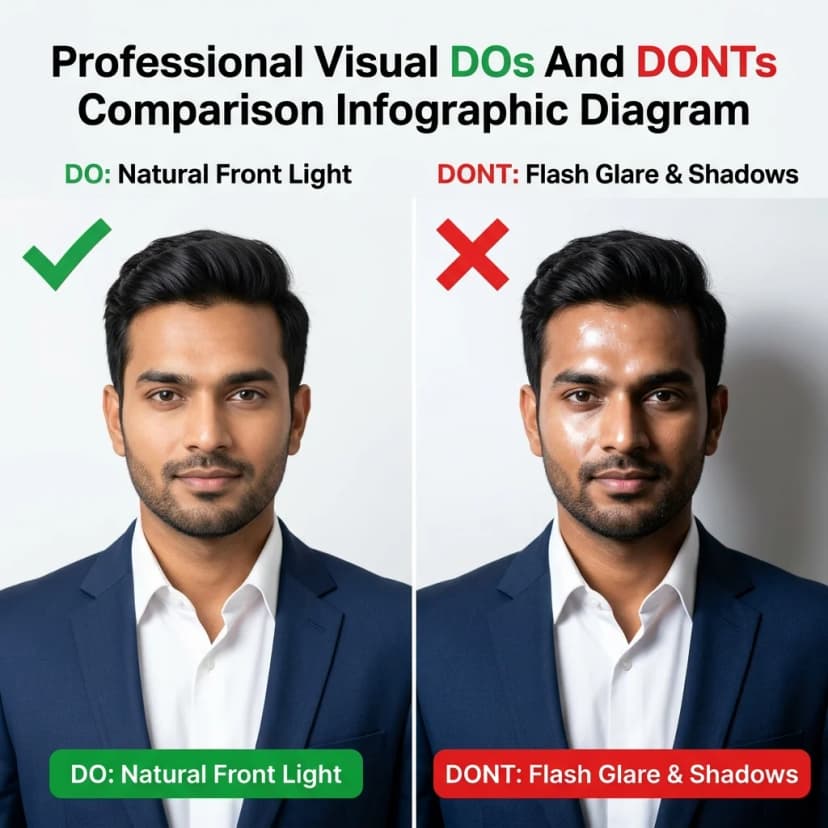
1. LightingApproved
Natural front window lighting vs flash glare side shadow comparison for passport photo
DO: Natural window front lighting, even shadowless exposure on both cheeks.
DONT: Flash glare, harsh overhead lighting, or side face shadow.
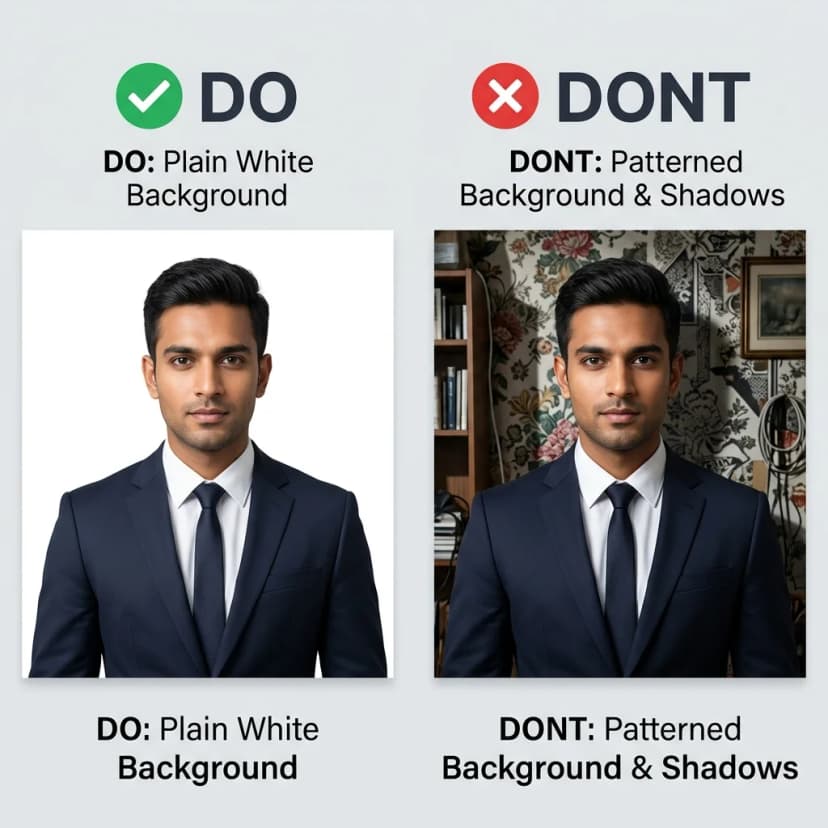
2. BackgroundPlain White
Plain white studio wall vs patterned wallpaper background requirement for visa photo
DO: Plain white or light off-white background wall.
DONT: Patterned wallpaper, furniture, shadows, or outdoors.
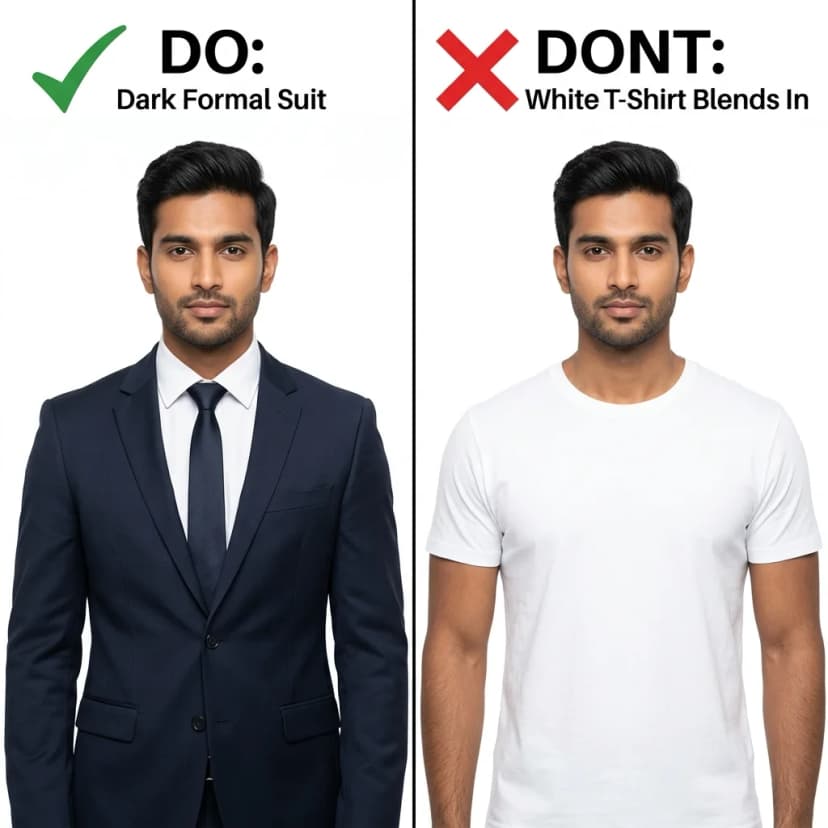
3. ClothingContrast
Dark formal navy suit vs white t-shirt clothing contrast rule for government ID photo
DO: Dark formal shirt, suit, or blazer with good background contrast.
DONT: White t-shirt that blends seamlessly into white background.
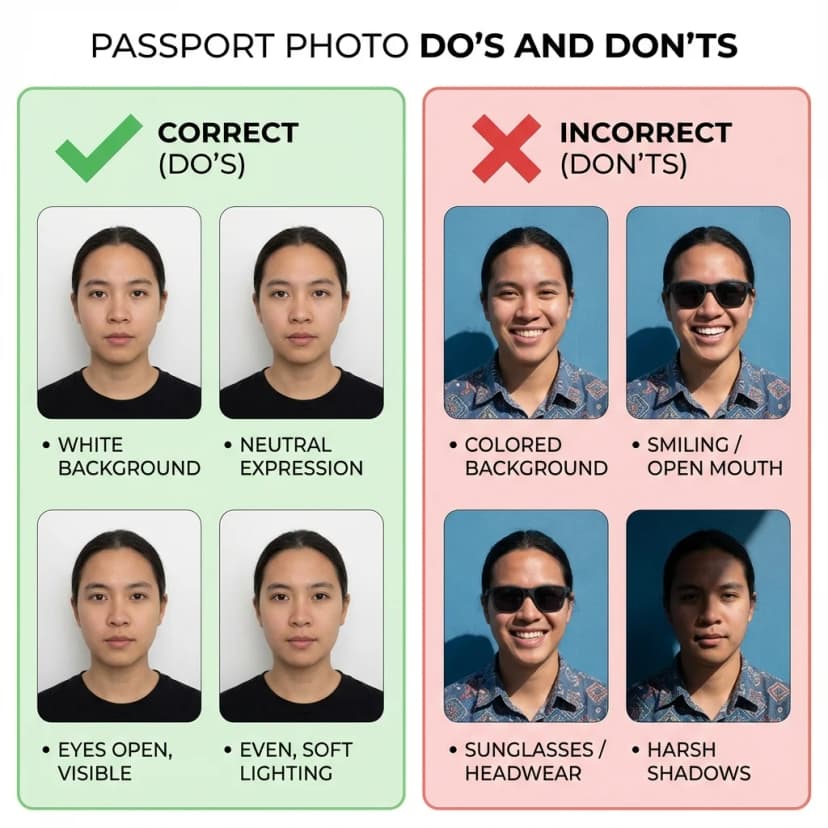
4. Pose & ExpressionNeutral
Neutral facial expression with visible ears vs smiling with cap and sunglasses rule
DO: Neutral facial expression, mouth closed, both ears & shoulders visible.
DONT: Smiling, frowning, tilted head, caps, or tinted glasses.

घर पर 100% सही साइज प्रिंट करने का तरीका

Prevent photo resizing errors in your local or home printer settings

Printer Calibration
1. Paper SelectionUse 180 GSM to 230 GSM Glossy or Matte Photo Paper. Avoid plain 75 GSM A4 copy paper.
2. Print Scale 100%Set scale to 100% (Actual Size). TURN OFF "Fit to Page" or "Shrink to Area".
3. Print QualitySelect High / Best Quality Photo in your printer preferences before clicking print.

आधिकारिक सरकारी गाइडलाइन्स व पोर्टल लिंक

Verified 2026 Standards

हमारे पासपोर्ट फोटो उपकरण सीधे आधिकारिक सरकारी मानकों के अनुसार डिज़ाइन किए गए हैं। सत्यापन के लिए आधिकारिक पोर्टल देखें:

Related Guides and Tools

पासपोर्ट फोटो एडिटर FAQ

क्या मैं पासपोर्ट फोटो ऑनलाइन फ्री में एडिट कर सकता हूं?

हां। कोई भी recent फोटो upload करें और यह editor वो तीन चीजें ठीक करता है जो forms असल में check करते हैं: 35x45mm crop, head size और margins, और साफ सफेद background। यह फ्री है, signup नहीं चाहिए, और पूरी तरह आपके browser में चलता है।

क्या पासपोर्ट फोटो एडिट करना allowed है?

Technical दिक्कतें ठीक करना allowed और expected है: 35x45mm crop, brightness सुधारना, और रंगीन background को सफेद करना। जो allowed नहीं है वो appearance बदलना है — skin smoothing filters, facial features बदलना, या चश्मा/hairline पर editing। Official portals और PSP 2.0 systems facial retouching पकड़ सकते हैं।

अपनी फोटो का background सफेद कैसे करें?

फोटो upload करें, background tool खोलें — editor मौजूदा background हटाकर plain white लगा देगा, आपका चेहरा और shoulders वैसे ही रहेंगे। यह तब सबसे अच्छा काम करता है जब original फोटो में lighting even हो और पीछे कोई गहरी shadow न हो।

मेरी फोटो किसी portal पर reject हो गई। क्या यह editor ठीक कर सकता है?

ज्यादातर rejection technical होती हैं — गलत pixel size (630x810 नहीं), file size limit से ज्यादा, off-white background, या गलत head margins। Reject हुई फोटो यहां upload करें, specific दिक्कत ठीक करें और दोबारा download करें। अगर rejection blurriness या lighting की वजह से थी, तो फोटो दोबारा खींचें।

एडिट करने के बाद कौन से file formats download कर सकता हूं?

JPEG/JPG और PNG, साथ में WEBP भी अगर छोटा modern format चाहिए। Online upload के लिए 630x810px JPEG use करें। Printing के लिए A4 या 4R sheet बनाएं जिसमें कई copies और cutting guides हों।

क्या यह official government website है?

नहीं। PassportSizePhoto.in independent private utility है। Final photo submit करने से पहले latest official requirements जरूर verify करें।

Independent utility notice: PassportSizePhoto.in का Passport Seva, MEA, UIDAI, NSDL या किसी government authority से affiliation नहीं है। यह tool photo prepare करने में मदद करता है, final acceptance relevant official portal या officer पर depend करती है।