Passport Photo Resolution Guide: DPI & Pixels
Understand resolution requirements to ensure your passport photo is sharp and clear. Learn about DPI, pixels, and quality standards.
Quick Overview
Resolution is one of the easiest passport-photo topics to overthink. At a basic level, the question is simple: does the image contain enough detail to stay sharp after cropping, resizing, and printing? If yes, you are in good shape.
Problems usually happen when a photo looks fine on screen but becomes soft on paper. That is why you need to think about both pixels and DPI together rather than treating them as the same thing. A phone photo can be excellent, but only if it is exported with the right dimensions and quality.
Simple Rule
Use at least 630×810 pixels for a standard 35×45mm passport photo and aim for 300 DPI or higher when printing. That combination works well for most applications.
Understanding Resolution
Resolution determines how sharp your passport photo appears. Two key concepts:
- Pixels: Total dots making up your image (width × height)
- DPI: Dots Per Inch - how many pixels per inch when printed
A photo can have a lot of pixels and still print badly if it is badly compressed, cropped too hard, or enlarged beyond what the original file can support. For that reason, resolution should always be checked after the final crop, not before it.
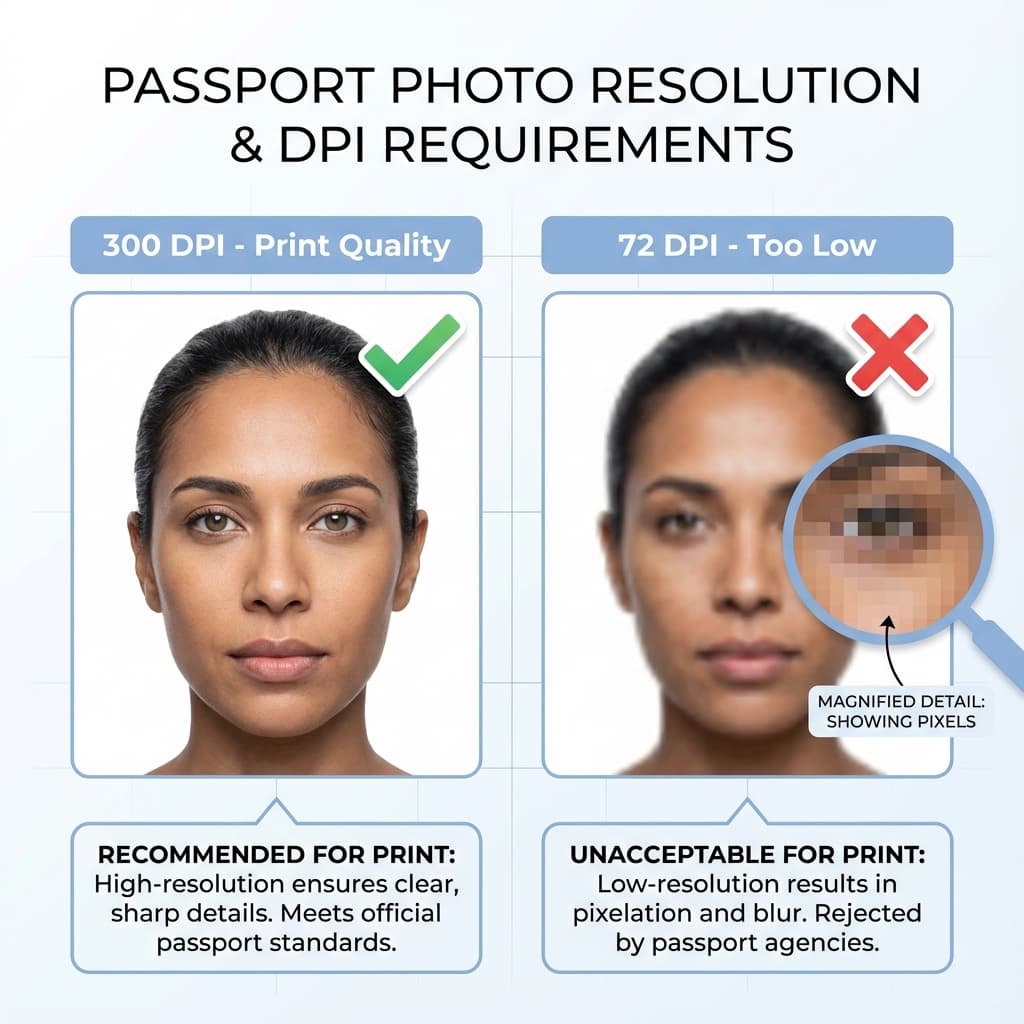
Quick Reference
- ✓ Minimum DPI: 300 DPI
- ✓ Recommended DPI: 600 DPI
- ✓ Minimum Pixels: 630 × 810 pixels
- ✓ Recommended: 1260 × 1620 pixels
If you are preparing the image for a portal, the upload rules may accept lower dimensions than a print shop would prefer. That is why it helps to keep a print-ready master file and make a separate upload copy when needed.
Resolution Requirements
For Printing
| Photo Size | At 300 DPI | At 600 DPI |
|---|---|---|
| 35 × 45 mm (India) | 413 × 531 px | 827 × 1063 px |
| 35 × 45 mm (Schengen) | 413 × 531 px | 827 × 1063 px |
These numbers matter because the physical size of the print determines how many pixels are spread across each inch. If you start with too little image data, the print has no way to magically become sharper later.
For Digital Upload
| Portal | Minimum | Recommended |
|---|---|---|
| Passport Seva | 630 × 810 px | 630 × 810 px |
| DS-160 (US Visa) | 600 × 600 px | 1200 × 1200 px |
If a portal only gives you a minimum, aim above it. Minimum values are often the lowest acceptable threshold, not the quality target. A stronger file is usually easier to work with and tends to survive cropping and compression better.
DPI Explained Simply
For a 35×45mm passport photo:
- At 300 DPI: approximately 413 × 531 pixels
- At 600 DPI: approximately 827 × 1063 pixels
DPI describes print density, not the sharpness of the screen preview. That is why people get confused: an image can appear fine on a monitor but still fail when printed if the effective DPI is too low for the final size.
| DPI | Quality | Use For |
|---|---|---|
| 72 DPI | ❌ Very Low | Screen only, NOT printing |
| 300 DPI | ✅ Standard | Minimum for passport photos |
| 600 DPI | ✅ High | Recommended for best results |
In most everyday passport workflows, 300 DPI is the safe minimum and 600 DPI is the comfort zone. Anything much lower is usually fine only for screen viewing, not for clean paper output.
How to Check Resolution
On Windows
- Right-click image → Properties → Details
- Look for "Dimensions" (e.g., 1260 × 1620)
On Mac
- Open in Preview → Tools → Show Inspector
- Check "Image DPI" and "Pixel dimensions"
A fast check is to open the file and zoom in to around 100 percent. If the face still looks crisp at that view, the original file is probably strong enough for passport work. If it already looks soft on screen, printing will only make that weakness more obvious.
Quick Check
If your photo is at least 1000 × 1000 pixels, you have enough resolution for passport photos.
Use This With File Size Guidance
Resolution and file size go together. If you need the export side too, see our file size guidefor the best balance of clarity and upload-friendly compression.
Phone Camera Resolution
| Camera | Resolution | Status |
|---|---|---|
| 8 MP | 3264 × 2448 px | ✅ More than enough |
| 12 MP | 4000 × 3000 px | ✅ Excellent |
| 48 MP | 8000 × 6000 px | ✅ Overkill |
Tip: Use rear camera for best quality. Front cameras often have lower resolution.
A high-megapixel phone is helpful, but it does not replace good technique. Steady hands, even light, and a proper crop matter more than chasing a larger sensor number.
Best Workflow
The easiest passport-photo workflow is to take the photo at the highest quality available, crop it once, and then export separate print and upload versions. That reduces the number of times the image gets recompressed.
- Capture the original photo in good light with the rear camera.
- Crop the face to the correct frame without enlarging the image too much.
- Export a print-ready version at 300 DPI or above.
- Export a smaller upload version only if the portal requires it.
This workflow keeps the original safe. If the first export looks too soft, you can return to the source image and try again rather than starting from a screenshot or a compressed copy.
Common Resolution Mistakes
Many people blame the camera when the real issue is the workflow. A sharp source image can still look weak if it is cropped badly, resized too often, or saved at a very low quality.
- Starting from a screenshot: Screenshots are usually too small for print.
- Checking resolution before cropping: The final crop is what matters.
- Over-enlarging the face: Makes the image look soft and unnatural.
- Using 72 DPI for print: That is screen quality, not print quality.
If you are unsure, err on the side of preserving the original image quality. It is much easier to reduce a sharp photo than to rescue one that has already been pushed too far.
For most users, the safest outcome is a photo that is slightly larger than the minimum requirement and then trimmed down carefully. That gives you room to adapt to different portals without sacrificing clarity.
If you are comparing camera exports, remember that a higher pixel count only helps when the source image is actually sharp. A large but blurry file is still blurry, so quality at capture time matters just as much as the final dimensions.
Frequently Asked Questions
What resolution is required for passport photos?
For print: minimum 300 DPI. For digital: at least 630×810 pixels. Higher resolution like 1260×1620 pixels is recommended for best quality.
What does DPI mean for passport photos?
DPI (Dots Per Inch) measures print resolution. 300 DPI means 300 dots of ink per inch. For a 35×45mm photo at 300 DPI, you need 630×810 pixels.
Is phone camera resolution enough for passport photos?
Yes! Most modern phones (8MP+) far exceed the minimum requirements. Even older phones with 5MP cameras are sufficient. Always use the rear camera for best quality.
Can I increase resolution of a low-quality photo?
Upscaling adds artificial detail but not real quality. The photo will appear blurry when printed. It is best to retake the photo at higher resolution.
What is the minimum pixel size for Passport Seva?
Passport Seva requires minimum 630×810 pixels, but 630×810 pixels is recommended for better quality and acceptance.
Why does my printed photo look blurry?
The photo resolution is too low for printing at that size. For a 35×45mm print, you need at least 630×810 pixels. Use higher resolution source photos.
What resolution for US visa DS-160?
DS-160 requires 600×600 to 1200×1200 pixels. The photo must be square format. We recommend 1200×1200 for best results.
Does cropping reduce photo resolution?
Yes, cropping removes pixels from your image. If you heavily crop a photo, the remaining area may have insufficient resolution. Take photos with minimal cropping needed.
What resolution does PassportSizePhoto.in output?
Our tool outputs photos at 630×810 pixels for digital use and 300 DPI for print layouts, meeting all standard passport requirements.
Is 72 DPI enough for passport photos?
No, 72 DPI is screen resolution only and far too low for printing. Photos at 72 DPI will appear pixelated and blurry when printed. Use minimum 300 DPI.
Should I crop before or after checking resolution?
Crop first, then check resolution. Cropping changes the final pixel count, so the number only matters after the image is in its final passport frame.
What happens if I enlarge a small photo?
Enlarging a small photo does not create new detail. It can make the image softer, so it is better to start from a higher-quality source photo whenever possible.
Is 630×810 always enough for print?
It is usually enough for a standard 35×45mm print, but a cleaner source file can still help if the photo needs to survive extra cropping or conversion.
Why does the same photo look different after printing?
Printing uses physical paper and ink, so a screen preview can look sharper than the final output. That is why DPI and pixel count matter so much.
Can I fix low resolution with sharpening?
Sharpening can help a little, but it cannot restore missing detail. It is best used as a small finishing step, not as a rescue method for a weak file.
What is the safest resolution if I want to print and upload the same file?
A higher-resolution master file around 1000 pixels or more on the short side is usually the safest starting point, because it gives you room to export both print and upload copies.
Does file size always increase with resolution?
Usually yes, but not perfectly. Compression, image complexity, and color detail all affect file size, which is why two photos with the same dimensions can still have different KB values.
Next practical step
After reading the guide, open the matching tool or reference page so capture, crop, upload, and print prep stay in the right order.
Create Your Passport Photo
Make a 35x45mm photo, download a digital file, or create a print-ready sheet.
Create Photo Free →