Passport Photo File Size Requirements
Avoid upload errors with the correct file size. Learn exact KB requirements for Indian passport, visa applications, and how to optimize your photo.
Quick Overview
File size is not the same as quality, but the two are closely linked. A passport photo that is too large may fail an upload form, while one that is too small often means the image was compressed so aggressively that detail has been lost.
The easiest way to think about it is this: the portal wants a file that is lightweight enough to handle quickly and strong enough to keep the face sharp. That balance is why file size matters just as much as crop and background.
Safe Starting Point
For Indian passport uploads, a JPEG in the 50-100 KB range is often a practical target, but the final acceptable range depends on the specific portal.
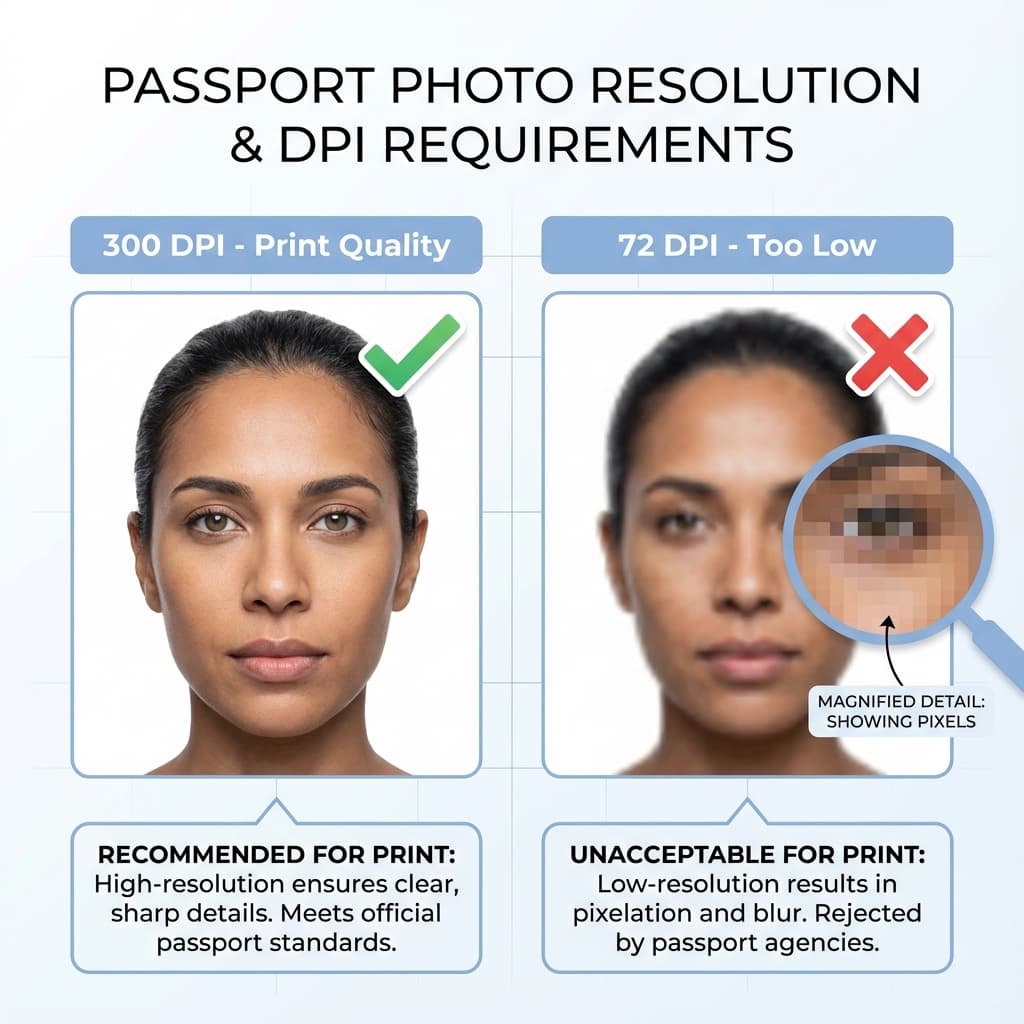
Why File Size Matters
When submitting passport photos online, your photo must meet specific file size requirements. Photos that are too large won't upload, while photos that are too small indicate poor quality.
The upload form is often the first check, but it is not the only one. If a file passes the size limit but has been over-compressed, it may still look muddy or pixelated when the application is reviewed. That is why quality should never be sacrificed just to hit a number.
Quick Reference
- ✓ Indian Passport: 10 KB - 250 KB
- ✓ US Visa DS-160: 240 KB or less
- ✓ UK Visa: Under 500 KB
- ✓ Aadhaar Update: 20 KB - 50 KB
The best file size is the one that works cleanly for the exact application you are using. Do not assume that a file accepted for one portal will also be accepted for another, because digital photo rules can change from one service to the next.
Requirements by Application
Indian Passport (Passport Seva)
| File Size | 10 KB - 250 KB |
| Format | JPEG/JPG only |
| Dimensions | 630 × 810 pixels |
| Recommended | 630 × 810 pixels, 50-100 KB |
Passport Seva requires JPEG format only, minimum 10KB, maximum 250KB.
Passport Seva is usually happiest with a file that is not too heavy and not too bare. If your image is sharply focused and the face crop is correct, you have a much better chance of passing the upload check without repeated resizing.
US Visa (DS-160)
| File Size | Maximum 240 KB |
| Format | JPEG/JPG only |
| Dimensions | 600 x 600 to 1200 x 1200 pixels |
The US visa system is strict about square framing and file size together. If you reduce the file to hit the KB limit, make sure the face still looks clear enough after the crop.
How to Check File Size
On Windows
- Right-click on the image file
- Select "Properties"
- Look for "Size" field
On Mac
- Right-click the file
- Select "Get Info"
- Check "Size" in the info window
On Smartphone
- Open photo in gallery
- Tap info/details icon
- Find file size in details
File size checks are easy to do, but make sure you check the final exported file rather than the original camera image. Once a photo is cropped or saved again, the size can change significantly.
How to Reduce File Size
Easiest Method
Use PassportSizePhoto.in to create a smaller upload file while keeping the photo readable.
The easiest way to reduce file size safely is usually to resize the image once and avoid repeating the save process. Every time a JPEG is re-saved, it can lose a little quality. Start from the original photo if you can.
Manual Methods
- Online compressors: TinyPNG, Compress JPEG, iLoveIMG
- Reduce dimensions: Resize to 630×810 pixels
- Adjust JPEG quality: 85-90% quality gives good balance
If you are using a compressor, keep the quality high enough that hair edges, eyes, and facial contours remain clean. Over-compressing can make the image look acceptable in a thumbnail but weak when someone inspects it closely.
Warning
Don't over-compress! Photos below 70% quality may appear blurry and get rejected.
A good file-size workflow is to work from the cleanest source image available, crop once, and then make the smallest adjustment needed to land inside the required range. That keeps the photo readable while still making the upload easy.
If you need to send the same photo to more than one portal, keep a master copy that is larger and higher quality than the upload version. That gives you flexibility if one application asks for a different size or a slightly different level of compression.
When in doubt, favor clarity over extreme compression. A slightly larger file that is still crisp is almost always better than a tiny file that looks soft once the form or print shop opens it.
Best Export Settings
If you are exporting from a phone editor or desktop app, a sensible starting point is JPEG, sRGB color, and a moderate quality setting. That keeps the photo broadly compatible with most passport portals.
- Format: JPEG/JPG
- Color space: sRGB for compatibility
- Quality: Around 85-90 percent
- Resize first: Then compress, not the other way around
Resize before compressing because image dimensions affect file size much more reliably than repeated quality saves. That approach gives you a smaller file without forcing the image into a blurry or heavily artifacted state.
Troubleshooting Workflow
If the first upload fails, do not keep guessing. Make one change at a time so you can tell whether the problem was the size, the format, or the image quality.
- Check the portal limit and confirm the file is in JPEG format.
- Reduce the pixel dimensions slightly if the file is still too large.
- Keep quality high enough that eyes, hair, and face edges remain clear.
- Re-upload the new export and compare it with the previous version.
A careful, step-by-step approach is usually faster than making five random changes in a row. You will learn which adjustment actually solved the issue instead of damaging the file in a way that is hard to reverse.
Common Errors & Solutions
| "File too large" | Compress image or reduce dimensions |
| "File too small" | Use original high-resolution photo |
| "Invalid format" | Convert to JPEG format |
If the portal still rejects the file after you have adjusted the size, try saving the photo again with a fresh name and a simpler export path. Sometimes the issue is the file container or metadata rather than the actual visible image.
Frequently Asked Questions
What is the file size limit for Indian passport photo?
For Passport Seva online applications, the photo should be between 10 KB to 250 KB. Most commonly, 50-100 KB works perfectly for passport applications.
How do I check my photo file size?
On Windows: Right-click → Properties → Size. On Mac: Right-click → Get Info. On phone: Open image in gallery and check details/info.
What happens if my file size is too large?
The upload will fail with an error message. You need to compress the image or reduce dimensions before trying to upload again.
What file format is required for passport photos?
JPEG (.jpg) is the standard format for digital passport photos. PNG is sometimes accepted but results in larger file sizes and may not work on all portals.
How do I reduce passport photo file size?
Use online compressors like TinyPNG, adjust JPEG quality to 85-90%, or reduce pixel dimensions. Our tool automatically optimizes file size for you.
What is the file size for US visa DS-160?
US visa photos must be no larger than 240 KB. The file must be in JPEG format with dimensions between 600x600 to 1200x1200 pixels.
Can I use PNG format instead of JPEG?
Most passport portals require JPEG format. PNG files are usually larger and may not be accepted. Convert PNG to JPEG before uploading.
What is the minimum file size for passport photos?
Files below 10 KB indicate poor quality and will likely be rejected. Aim for at least 20-30 KB minimum to ensure adequate image quality.
Why is my photo showing as too small?
This means your photo resolution is too low or over-compressed. Use the original high-resolution photo and reduce compression instead of dimensions.
Does PassportSizePhoto.in optimize file size?
Yes! Our tool automatically optimizes your photo to the correct file size range for Indian passport applications. No manual compression needed.
Should I compress before or after cropping?
Crop first, then compress. Cropping to the final passport frame removes unnecessary pixels and helps you reach the target file size without extra quality loss.
Can I keep the original file as a backup?
Yes, and you should. Always save the original high-resolution image so you can make another export if the first file gets rejected.
What file size is usually a good target for Indian passport photos?
A range around 50-100 KB is often practical for online submission, but the final acceptable size depends on the portal and the image quality after export.
Does lowering quality always reduce file size safely?
It reduces the size, but only to a point. If the quality setting drops too far, the photo can look blurry or artifact-heavy even though the file becomes smaller.
What should I do if the file is below 10 KB?
Go back to the original image and export again at a higher quality. A very small file usually means the photo has been compressed too aggressively for reliable use.
Can file names affect uploads?
Sometimes. If a portal behaves oddly, try renaming the file with a simple name and uploading again. The image itself matters most, but clean file naming can help avoid edge-case issues.
Should I use the same file for printing and online upload?
You can use the same master image, but it is better to export one version for print and another for upload. That keeps each copy tuned to its own size limit.
How do I know if compression went too far?
If the face looks soft, the edges show blocky artifacts, or the background starts looking patchy, the file has likely been compressed too much and should be exported again.
What if the portal still says the file is incorrect?
Check the format, dimensions, and KB size in that order. If all three are correct, try a fresh export from the original image because metadata or an odd save step may be causing the problem.
Next practical step
After reading the guide, open the matching tool or reference page so capture, crop, upload, and print prep stay in the right order.
Create Your Passport Photo
Make a 35x45mm photo, download a digital file, or create a print-ready sheet.
Create Photo Free →