OCI Card Photo Requirements
Everything you need to know about photo specifications for Overseas Citizen of India card applications. Complete guide covering digital and print requirements.
Understanding OCI Card Photo Requirements
The Overseas Citizen of India (OCI) card is a lifelong visa alternative for people of Indian origin or foreign spouses of Indian citizens. Getting your photo right is essential for a smooth application process.
OCI applications often use an OCI card-specific 2×2 inches (2×2 inch square) format, while Indian passport applications now use 35×45mm. Check your mission's OCI checklist before reusing any passport photo.
That similarity is useful, but it can also create confusion. Applicants often assume any passport-style photo will work without checking the date, crop, or digital upload limits. The safest approach is to treat OCI as a strict submission with OCI-specific sizing, clean white background, and exact portal file limits.
Key Point
OCI card photo specifications are OCI-card specific. Do not assume a passport photo will always work unless it also matches the OCI checklist.
Freshness Matters
Even if the pose looks fine, a photo older than 6 months can be rejected. For OCI, freshness matters because the document is tied to your current appearance and the image should look current at the time of upload or submission.
Photo Specifications
Your OCI card photo must meet the following specifications. The requirements are not complicated, but they are strict enough that even small changes in crop or exposure can cause trouble later in the process.
| Specification | Requirement |
|---|---|
| Photo Size | 2×2 inches (2×2 inch square) |
| Background | Plain white |
| Expression | Neutral, mouth closed |
| Eyes | Open and clearly visible |
| Face Coverage | 80–85% of photo frame |
| Photo Age | Within 6 months |
| Color | Full color (not black & white) |
| Paper | Photo quality paper |
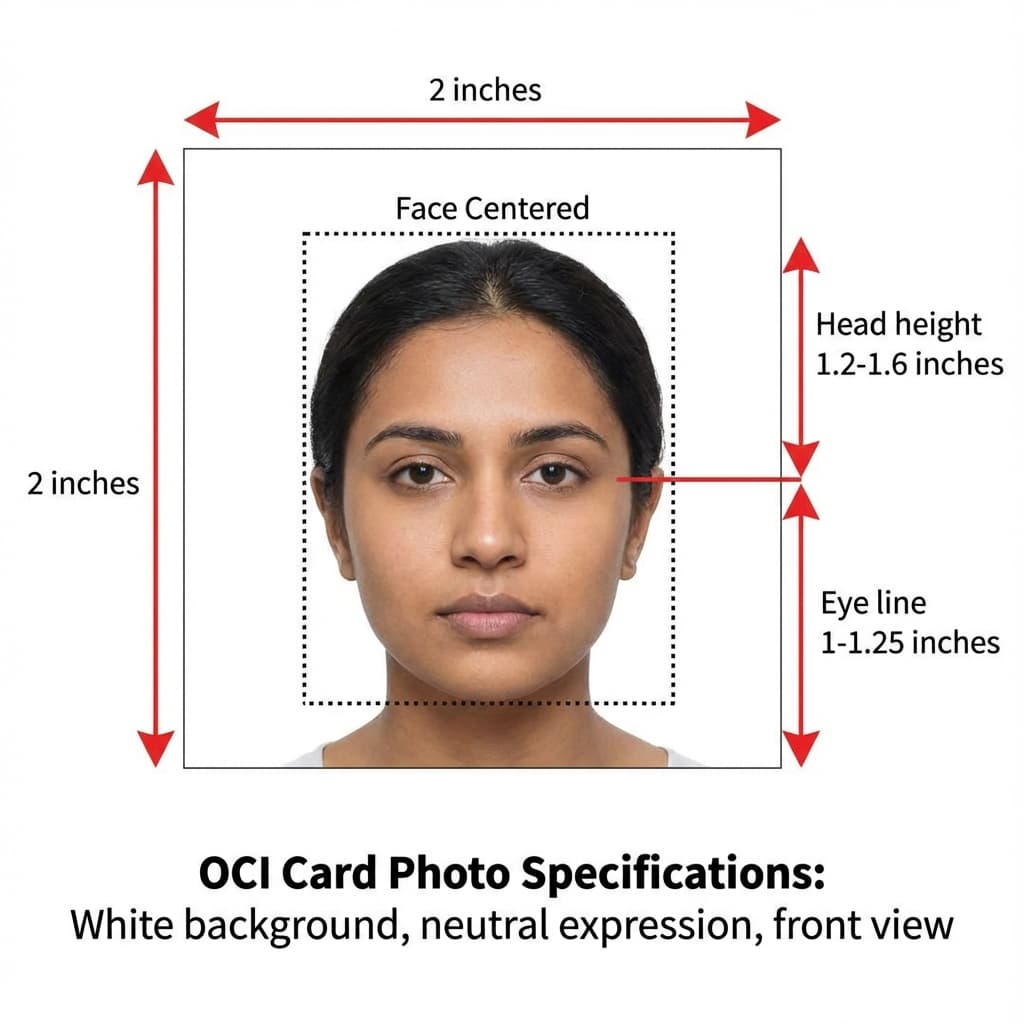
A good OCI photo should look calm and balanced. The face needs to be centered, the shoulders should be level, and the background should look uniformly white rather than patchy or grey. If you are creating the photo at home, stand a little away from the wall so shadows do not fall directly behind your head.
Digital Upload Requirements
For online OCI applications, your digital photo must meet specific technical requirements:
| Parameter | Requirement |
|---|---|
| File Format | JPEG/JPG |
| File Size | 10 KB - 300 KB |
| Minimum Dimensions | 350×350 pixels |
| Maximum Dimensions | 1000×1000 pixels |
| Color Space | sRGB |
| Background | White (#FFFFFF) |
Automatic Optimization
PassportSizePhoto.in automatically optimizes your photo to meet OCI portal requirements, including correct file size and dimensions.
When uploading to the OCI portal, the safest files are simple JPEGs with a clean crop and a natural color profile. Avoid over-sharpened images, filters, and heavy background edits. If your file is too large, resize the pixel dimensions rather than crushing the image quality.
One practical trick is to keep both the original and the optimized version. That way, if a portal rejects the first file, you can quickly try a slightly larger or smaller export without retaking the photo.
Print Photo Requirements
If submitting physical photos (common for in-person applications at consulates):
Print Specifications
- • Paper type: Glossy or semi-gloss photo paper (180-220 GSM)
- • Print size: Exactly 2×2 inches, no white borders
- • Quality: High resolution, no pixelation or blur
- • Quantity: 2 photos minimum, 4-6 recommended
- • Condition: Unbent, no scratches, no staple marks
It is worth checking the print under daylight or bright indoor light before you submit it. A print that looks fine on a screen can still have faint banding, a yellow cast, or uneven edges once it comes off the printer. Keeping extra copies gives you backup without stress.
OCI Photo vs Passport Photo
They Are Identical
OCI card photos follow these core OCI-specific requirements:
- ✓ Same physical size (2×2 inches)
- ✓ Same background (white)
- ✓ Same expression requirements (neutral)
- ✓ Same digital specifications for online upload
- ✓ Same validity period (6 months from photo date)
If your recent photo matches OCI sizing and quality rules, you can reuse it for your OCI application (if taken within the last 6 months).
The only time you should hesitate is when the original passport photo was cropped too tightly, the file was compressed heavily, or your appearance has changed enough that the older photo no longer feels accurate. In those cases, retaking the image is the safer move.
OCI Photos for Children
Children and infants follow the same size rule, but the practical setup is different. The key is to keep the child comfortable while still getting a clean, recognizable face with eyes open and no distracting objects in frame.
Children and Infants
- • Same size requirements: 2×2 inches for all ages
- • Eyes must be open: This is the most challenging aspect for infants
- • White background: Use a white sheet if photographing at home
- • Neutral expression: Required but enforcement is relaxed for babies
- • No support visible: Parents' hands or supports should not appear
For babies under 1 year, authorities are more lenient about expression and eye position. The key requirement is that the child's face is clearly visible and recognizable.
A simple white bedsheet or plain pillow cover can work well as a background at home. Try taking the photo just after feeding or when the child is calm, because a settled baby is much easier to position correctly without needing awkward editing afterward.
Common Mistakes to Avoid
Most OCI rejections come from avoidable issues, not from anything unusual. The recurring problems are usually size mismatch, poor background cleanup, or using a file that is either too compressed or too old.
Avoid These Errors
- ❌ Using old photos: Photos must be taken within 6 months
- ❌ Wrong size: Using US visa size instead of Indian passport size
- ❌ Colored background: Only white or pure white (#FFFFFF) is accepted
- ❌ Too large file: Exceeding 300 KB for online uploads
- ❌ Wrong format: Using PNG instead of JPEG for uploads
- ❌ Shadows on face: Uneven lighting causing shadows
- ❌ Over-editing: Too much smoothing or background replacement
- ❌ Wrong crop: Head too large or too small in the frame
If you want the most forgiving workflow, create the photo once, export a print version and a digital version, and keep the source image. That makes corrections much easier if the first upload is rejected for a technical reason.
OCI Submission Checklist
Before you submit, do one last pass through the file and the print. A quick checklist is often enough to catch the tiny errors that create avoidable delays.
- • Photo is 2×2 inches with a plain white background
- • Face is centered and current appearance is accurate
- • Digital file is JPEG and within the portal size range
- • Print is clean, unbent, and free of borders or marks
- • Extra copies are stored safely in case of a re-upload
If you are submitting through a relative, agent, or service desk, make sure the final file they upload is the same one you reviewed. That sounds obvious, but it is one of the easiest ways for a correct photo to be replaced by an older or compressed copy.
If the photo still feels uncertain after your review, compare it against your latest passport photo. The closer the pose, background, and crop are to that style, the less likely you are to run into a compliance problem during submission.
Frequently Asked Questions
Is the OCI photo same as Indian passport photo?
OCI card uses its own OCI-specific 2×2 inches (2×2 inch square) format in many workflows, while Indian passport applications now use 35×45mm. Always confirm the OCI checklist for your mission before submitting.
How many photos are needed for OCI card application?
Typically 2 photos are required for the application form. We recommend keeping 4-6 extra copies as backup for any additional documentation or resubmission needs during the process.
Can I use my existing passport photo for OCI application?
Yes, if your passport photo is recent (taken within the last 6 months) and meets the standard specifications. Make sure it accurately represents your current appearance, especially if you have changed your hairstyle or facial features.
What is the file size requirement for online OCI application?
For online applications through the OCI portal, the photo file should be in JPEG format, between 10 KB and 300 KB, with minimum dimensions of 350×350 pixels (OCI-specific). Our tool automatically optimizes photos to meet these requirements.
Are the photo requirements different for OCI applications in different countries?
The photo specifications are consistent worldwide as they follow Indian government standards. However, individual consulates may have specific submission preferences, so check with your local Indian mission when in doubt.
Can children have a different photo size for OCI cards?
No, children of all ages must have the same 2×2 inch photo specifications as adults. For infants and young children, eyes must be open, but achieving a perfectly neutral expression is not strictly enforced.
Do I need to submit photos for OCI card renewal?
Yes, OCI card renewal requires new photos. Even if your appearance has not changed significantly, you need fresh photos that are less than 6 months old at the time of application.
What if my OCI photo gets rejected?
If rejected, review the specific reason provided and retake the photo addressing that issue. Common reasons include wrong size, non-white background, or poor quality. Using our tool ensures compliance with all specifications.
Can I wear glasses in my OCI card photo?
For OCI cards following Indian specifications, clear prescription glasses without glare are allowed. However, if you hold citizenship of a country that prohibits glasses (like the US), follow those rules for the photo on your residence country documents.
How long does OCI card photo remain valid?
The photo must be taken within 6 months of the application date. Once your OCI card is issued, the photo on the card remains valid for the lifetime of the card, which for adults is typically until age 50 or 50 years from the issue date.
Can I use the same OCI photo for my spouse and children?
No, each applicant should have their own current photo. Even if family members are submitting together, the image must match each person individually and should be recent for every application.
Should I keep both digital and printed OCI photos?
Yes. A digital version helps with portal upload and a printed version is useful if the consulate asks for hard copies. Keeping both versions also makes it easier to resubmit quickly if one file gets rejected.
Can I use a studio photo if the lighting looks a little warm?
You can only use it if the color still looks natural and the background remains plain white. If the warmth makes the image feel yellow or uneven, it is safer to correct the lighting or retake the photo.
What is the easiest way to avoid an OCI rejection at upload time?
Start from a recent, sharp, 2×2-inch photo with a plain white background, then export a clean JPEG for the portal. That combination solves most of the common digital and print problems at once.
Create Your OCI Photo Now
Same tool used for Indian passport photos. Free and instant.
Create Free OCI Photo →Next practical step
After reading the guide, open the matching tool or reference page so capture, crop, upload, and print prep stay in the right order.
Create Your Passport Photo
Make a 35x45mm photo, download a digital file, or create a print-ready sheet.
Create Photo Free →