How to Print Passport Photos at Home
Save money by printing your own passport photos. Complete guide covering paper selection, printer settings, and cutting techniques for perfect results.
Printing passport photos at home can save you ₹50-200 per set compared to photo studios, and you get unlimited prints from a single photo paper sheet.
The print step is where many good photos go wrong. If scaling is off, the paper is loaded backward, or the wrong finish is selected, the image can look stretched or soft even when the source file is perfect.
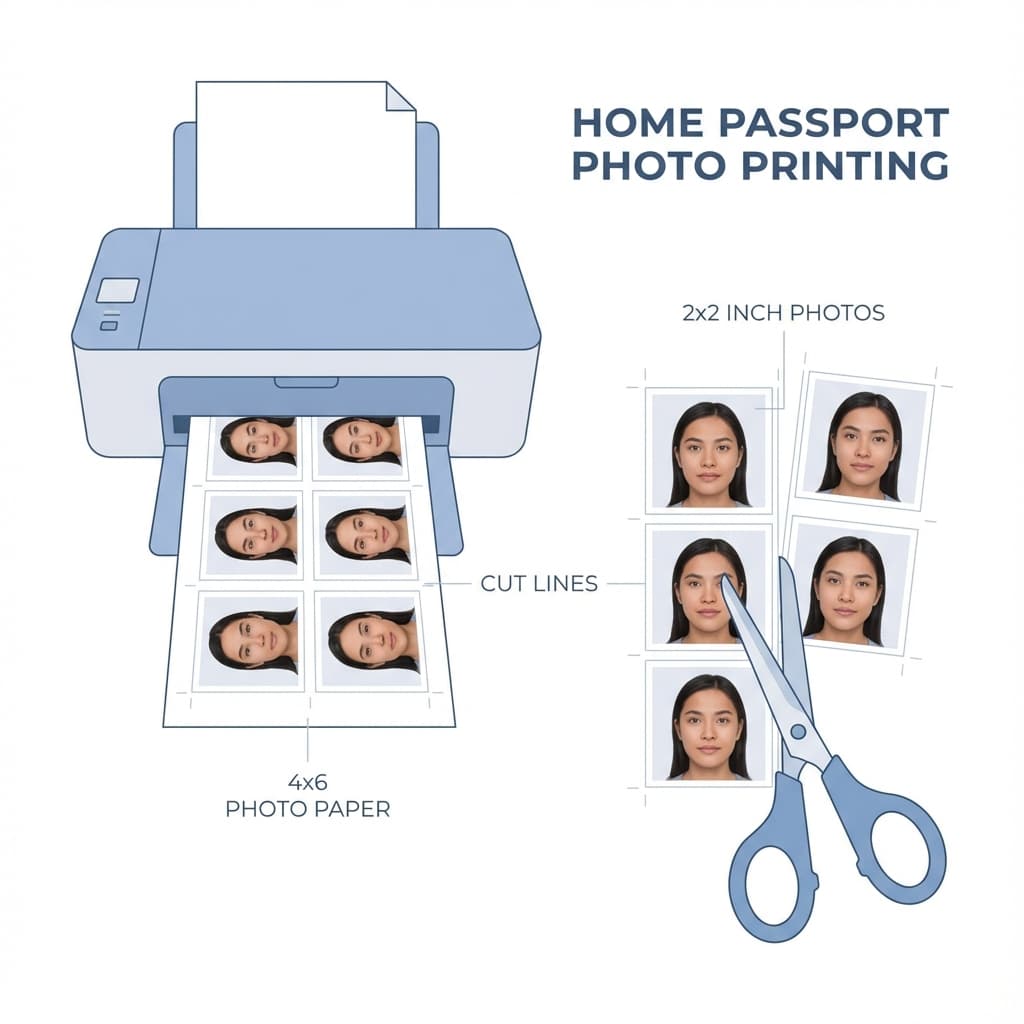
What You Need
- Inkjet photo printer (any brand works)
- Photo paper (4x6 or A4 size, glossy or matte)
- Passport photo file (from PassportSizePhoto.in)
- Paper cutter or scissors
- Ruler (for measuring)
Quick Tip
PassportSizePhoto.in provides a ready-to-print layout with multiple photos arranged on a 4x6 sheet. Just print and cut!
Choosing the Right Paper
Recommended Paper Types
| Paper Type | GSM | Best For |
|---|---|---|
| Glossy Photo Paper | 180-220 | ✅ Passport photos (recommended) |
| Semi-Gloss/Satin | 180-220 | ✅ Good alternative |
| Matte Photo Paper | 180-220 | ⚠️ Acceptable |
| Regular Paper | 70-90 | ❌ Not acceptable |
Popular Brands in India
- Premium: Epson, Canon, HP (₹300-400 for 20 sheets)
- Value: Bambalio, Oddy (₹150-200 for 50 sheets)
Printer Settings
Correct printer settings are crucial for quality output:
Before printing on photo paper, open the dialog and disable any automatic enhancement, borderless fitting, or page resizing features. Those shortcuts are convenient for casual prints, but they are risky for official document photos.
Essential Settings
| Quality | Best / High / Photo |
| Paper Type | Photo Paper Glossy |
| Paper Size | 4x6 or A4 (match your paper) |
| Color | Full Color |
| Scaling | 100% / Actual Size (no scaling) |
Important
Never use "Fit to Page" or "Scale to Fit" options. This will resize your photo and make it the wrong size!
Printing Process
- Load photo paper correctly (glossy side up or as indicated)
- Open your photo file (print layout from our tool)
- Select correct printer and verify settings
- Print a test on regular paper first
- Measure the test print - should be exactly 35×45mm
- Print on photo paper once size is verified
- Let ink dry for 2-3 minutes before handling
Cutting the Photos
Tools You Can Use
- Paper cutter/guillotine: Best for straight, clean cuts
- Craft knife + ruler: Good precision with practice
- Scissors: Possible but harder to get straight edges
Cutting Tips
- Cut slightly outside the crop marks (you can trim more if needed)
- Use a metal ruler as guide for straight cuts
- Cut slowly to avoid jagged edges
- Round corners slightly (optional, for natural look)
If you are printing a sheet with multiple photos, cut one sample first and measure it before trimming the rest. That small pause can save you from wasting an entire page of photo paper.
Pro Tip
Measure your cut photos with a ruler to verify 35×45mm size before submitting.
Cost Comparison
| Option | Cost per Set (4 photos) | Notes |
|---|---|---|
| Photo Studio | ₹80-200 | Convenient but expensive |
| Print at Home | ₹10-20 | Paper + ink cost only |
| Photo Kiosk | ₹50-100 | Self-service machines |
Savings: Printing at home saves ₹60-180 per set. With a pack of 50 photo paper sheets, you can print hundreds of photos!
For the cleanest results, store unused sheets flat in a dry place and keep them away from dust. Bent or damp paper can curl during printing, which makes the edges harder to cut neatly.
Troubleshooting Print Problems
If the print looks too light
- • Increase print quality
- • Check the correct paper type setting
- • Replace low ink cartridges if needed
If the print is blurry
- • Make sure scaling is set to actual size
- • Use a sharper source file
- • Let the printer finish fully before handling the sheet
A small printer issue can affect the whole sheet, so it helps to run one test page before using the final photo paper. That habit costs very little and saves time when you need the print to look neat on the first real attempt.
When Home Printing Makes Sense
- When you need photos quickly and do not want to visit a studio
- When you want several copies for future use
- When your printer already supports photo paper well
- When you want to control the crop, cut marks, and final layout yourself
For very important submissions, a studio is still a useful fallback if your printer is old or your paper stock is inconsistent. But for most everyday passport and visa needs, home printing is perfectly practical when the setup is careful.
Frequently Asked Questions
What paper is best for passport photos?
Glossy photo paper with 180-220 GSM weight produces the best results. This provides vibrant colors and professional finish. Matte paper is also acceptable but colors may appear slightly less vibrant.
Can I use regular printer paper for passport photos?
No, regular paper will produce poor quality prints with washed-out colors and visible pixelation. These will likely be rejected by authorities. Always use proper photo paper of at least 180 GSM.
What printer settings should I use for passport photos?
Set quality to Best or High, paper type to Photo Paper Glossy, color mode to Full Color, and most importantly set scaling to 100% or Actual Size. Never use Fit to Page option.
How many passport photos fit on a 4x6 sheet?
A standard 4x6 inch photo paper can fit 4 passport photos (35×45mm each) with minimal wastage. On A4 paper, you can fit 16-20 photos depending on layout.
Do I need a special printer for passport photos?
Any inkjet photo printer works well. Laser printers are not recommended as they may produce less accurate colors and the toner can crack when folded. Budget inkjet printers from brands like HP, Epson, or Canon work perfectly.
How do I cut passport photos perfectly straight?
Use a paper cutter (guillotine) for best results. Alternatively, use a craft knife with a metal ruler on a cutting mat. Cut slowly and precisely for clean edges. Avoid scissors as they rarely produce straight lines.
Why does my printed photo look different from screen?
Screen and print colors differ due to RGB vs CMYK color spaces. Ensure you are using genuine printer ink and have selected the correct paper type in printer settings. Calibrating your monitor can also help.
How long should I wait before touching the printed photo?
Let the ink dry for at least 2-3 minutes before handling. For glossy paper, wait 5 minutes to prevent smudging. Fully cured prints take about 24 hours, but are safe to handle after a few minutes.
Can I use an old printer for passport photos?
Yes, as long as it prints in color and the print heads are not clogged. Run a nozzle check and cleaning cycle before printing. If colors are streaky or missing, replace the ink cartridges.
What if my printed photos are the wrong size?
This usually happens when scaling is enabled in print settings. Always select Actual Size or 100% scaling. Print a test on regular paper first and measure with a ruler before using photo paper.
Next practical step
After reading the guide, open the matching tool or reference page so capture, crop, upload, and print prep stay in the right order.
Create Your Passport Photo
Make a 35x45mm photo, download a digital file, or create a print-ready sheet.
Create Photo Free →