Best Photo Paper for Passport Photos
Complete guide to choosing the right paper for printing passport photos at home. Compare glossy vs matte, understand GSM weight, and find the best brands available in India.
Why Paper Choice Matters
Using the right photo paper is crucial for passport photos. Wrong paper can make a clear image look dull, blurry, or unprofessional.
This guide covers paper types, GSM weight, brand choices, and simple printing advice so you can choose a sheet that works well at home.
What Happens With Wrong Paper
- ❌ Faded colors
- ❌ Soft or low-detail prints
- ❌ Ink bleeding or smudging
- ❌ A flimsy, unprofessional feel
Paper Types Explained
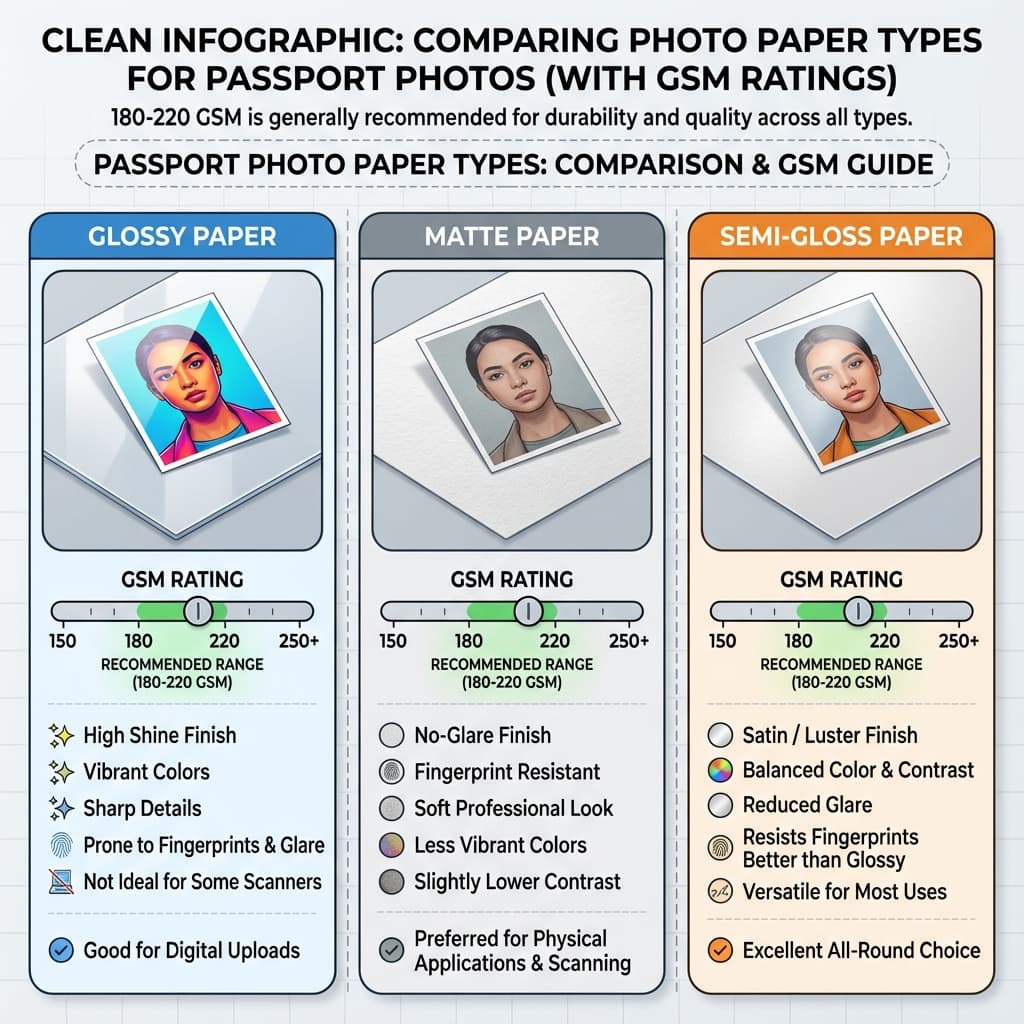
Photo paper comes in several finishes. Here is a quick comparison of the main options.
| Type | Finish | Colors | Fingerprints | Best For |
|---|---|---|---|---|
| Glossy | Shiny, reflective | Most vibrant | Shows easily | Official photos |
| Semi-Gloss/Satin | Subtle sheen | Very good | Moderate | All-purpose |
| Matte | No shine | Slightly muted | Resistant | Less glare |
| Luster | Textured sheen | Excellent | Moderate | Professional look |
Understanding GSM (Paper Weight)
GSM stands for Grams per Square Meter and tells you how thick and sturdy the paper feels.
| GSM Range | Feel | For Passports? | Notes |
|---|---|---|---|
| 70-80 | Regular printer paper | ❌ Not suitable | Too thin, will absorb ink |
| 120-150 | Light photo paper | ⚠️ Budget option | Works but may feel flimsy |
| 180-200 | Standard photo paper | ✅ Recommended | Ideal for passport photos |
| 220-250 | Premium photo paper | ✅ Excellent | Professional quality |
| 270-300 | Heavy/thick paper | ✅ High-end | May not work in all printers |
Recommendation
For passport photos, use 180-220 GSM glossy or semi-gloss paper. It is thick enough for a premium look but still friendly to most home printers.
Glossy vs Matte: Which is Better?
Glossy Paper
- ✅ Most vibrant colors
- ✅ Sharpest details
- ✅ Classic photo look
- ✅ Most common for ID photos
- ❌ Shows fingerprints easily
- ❌ Can have glare under lights
Matte Paper
- ✅ No fingerprint marks
- ✅ No glare or reflection
- ✅ Easier to handle
- ✅ Modern, subtle look
- ❌ Slightly less vibrant
- ❌ Less common for passports
Verdict: Glossy is the classic choice, while matte is useful when you want less glare. Both can work if the paper is good quality.
Best Brands in India
Premium Brands
| Brand | GSM | Price | Quantity | Per Sheet |
|---|---|---|---|---|
| Epson Premium Glossy | 255 | ₹350-400 | 20 sheets | ₹17-20 |
| Canon Photo Paper Pro | 265 | ₹400-450 | 20 sheets | ₹20-22 |
| HP Advanced Photo | 250 | ₹300-350 | 25 sheets | ₹12-14 |
Value Brands
| Brand | GSM | Price | Quantity | Per Sheet |
|---|---|---|---|---|
| Bambalio Glossy | 230 | ₹180-220 | 50 sheets | ₹3.5-4.5 |
| Oddy Photo Paper | 200 | ₹150-180 | 50 sheets | ₹3-3.5 |
| Gocolor Glossy | 210 | ₹120-150 | 50 sheets | ₹2.5-3 |
| JK Photo Paper | 185 | ₹100-130 | 50 sheets | ₹2-2.5 |
Cost Analysis: Paper Per Photo
Cost Breakdown
- • 4x6 inch sheet: Fits 4 passport photos
- • Value brand cost: About ₹1 per photo
- • Premium brand cost: About ₹4-5 per photo
- • A4 sheet: Fits more photos and lowers the cost further
Bottom line: printing at home usually costs only a few rupees per photo.
Where to Buy Photo Paper
Online
- • Amazon India: Wide selection, reviews
- • Flipkart: Regular deals and discounts
- • Official brand stores: Epson, Canon, HP websites
Offline
- • Stationery stores: Basic options
- • Computer shops: Near printer supplies
- • Photography supply stores: Premium options
How to Choose the Right Paper Quickly
Choose glossy if you want:
- • The strongest contrast
- • A classic passport-photo finish
- • The sharpest-looking print for most printers
Choose matte if you want:
- • Less glare under bright light
- • Easier handling with fewer fingerprints
- • A softer, more understated look
If you are unsure, start with a 180-220 GSM glossy or semi-gloss sheet from a known brand. That combination is usually the safest middle ground because it balances print quality, durability, and ease of use.
Also keep your printer in mind. Some printers handle heavier sheets beautifully, while others feed lighter paper more reliably. The best paper is not only the one that looks good, but the one your printer can feed cleanly every time.
Tips for Best Print Quality
Printing Best Practices
- 1. Use the correct tray: Feed the paper as your printer expects.
- 2. Choose photo mode: Pick “Photo Paper” or “Glossy.”
- 3. Set highest quality: Use “Best” or “High Quality.”
- 4. Print on the coated side: The glossy side should face the print head.
- 5. Let ink dry: Wait a few minutes before handling.
- 6. Use genuine ink: It usually gives better color.
After printing, let the sheet sit flat for a little while before cutting. Photo paper can feel dry on the surface while still settling underneath, and waiting a few minutes helps reduce smudges, curl, and fingerprints.
How to Store and Handle Photo Paper
Good paper can still produce a weak result if it is stored badly. Keep photo paper flat inside the original pack, away from heat, humidity, and direct sunlight. If the sheets bend or absorb moisture, they may feed unevenly and create print marks.
When you are ready to print, touch only the edges of the sheet. Finger oils can leave faint marks that become visible after printing, especially on glossy finishes. If you are printing a batch for different documents, separate the sheets cleanly before cutting so you do not bend the corners.
It also helps to keep a note of which paper works best with your printer. Some printers prefer lighter semi-gloss sheets, while others handle premium glossy sheets better. Once you find a combination that prints cleanly, reuse it for future passport photos instead of experimenting every time.
Matching Paper to Your Printer
Inkjet printers
These usually work well with coated glossy or semi-gloss paper because the ink sits on the surface and creates sharp detail.
Budget home printers
A slightly lighter 180-200 GSM sheet is often safer because it feeds more smoothly and reduces the chance of jams.
Higher-end printers
Premium 220 GSM and above can work nicely if the tray and paper path support thicker sheets without curling or slipping.
The paper is only one part of the final result. Correct print size, a clean crop, and enough ink coverage matter just as much. If one of those pieces is off, even expensive paper will not save the photo.
When to Upgrade Your Paper
If your first prints look soft, curl badly, or show fingerprints too easily, that is usually a sign to move up to a better sheet. Upgrading paper does not need to be expensive. Often the biggest jump in quality comes from choosing a more reliable coating and a slightly heavier GSM.
A better sheet is especially worth it if you print photos often or need multiple copies for different documents. The better the base paper, the less time you spend reprinting and trimming. It also gives you a more consistent result if you plan to keep a small stack for future use.
The goal is not to buy the most expensive pack on the shelf. The goal is to find a paper that feeds cleanly, dries well, and gives you a photo that looks neat in both printed and uploaded form.
Frequently Asked Questions
What paper is best for passport photos?
Glossy photo paper with 180-220 GSM is the safest choice because it gives sharp detail and a clean finish.
Is matte paper acceptable for passport photos?
Yes, matte paper is acceptable and is useful if you want less glare or fewer fingerprints.
Can I use normal printer paper for passport photos?
No, regular paper is too thin and usually produces weak, low-quality prints.
What GSM should I use for passport photos?
Aim for 180-220 GSM. That range feels sturdy without causing problems in most home printers.
Which brand of photo paper is best for passports?
Epson, Canon, HP, Bambalio, Oddy, and Gocolor are all solid choices if the paper meets the weight requirement.
How many passport photos can I print on one sheet?
A 4x6 sheet usually holds 4 passport photos, while A4 layouts can fit many more.
Does photo paper have an expiry date?
Yes, photo paper can age. Store it flat, dry, and away from sunlight.
Can I use inkjet paper for passport photos?
Yes, if it is real inkjet photo paper with the right weight and finish.
Why do my passport photos look different from studio prints?
Studio prints often use professional equipment, but home prints can look close with good paper, settings, and ink.
Is glossy paper better than satin/semi-gloss?
Both work well. Glossy is brighter, while semi-gloss is a little easier to handle.
How do I know if my paper is coated on the right side?
Most photo paper has a noticeably smoother or shinier side. That coated side is the one you should print on for the best finish.
Can cheap photo paper still work for passport photos?
Yes, if the weight is good and the print comes out sharp. Cheap paper is fine for practice, but the result should still look neat and clean.
Should I print passport photos in color or black and white?
Use color unless the application specifically asks for something else. Color prints usually look more natural and make skin tones easier to judge.
Why does my photo curl after printing?
Curl often happens when paper is too light, stored badly, or printed with too much ink. Using better paper and letting it rest flat usually helps.
Create Print-Ready Photos
Create your passport photo and download a print-ready sheet for free.
Create Free Passport Photo →Next practical step
After reading the guide, open the matching tool or reference page so capture, crop, upload, and print prep stay in the right order.
Create Your Passport Photo
Make a 35x45mm photo, download a digital file, or create a print-ready sheet.
Create Photo Free →