Passport Photo Background Color Requirements
Get the background right for your passport photo. Learn exact color requirements and DIY setup tips.
Quick answer
For Indian passport photos, the safest background is plain white or very light off-white. The background must be uniform, free from patterns, and free from visible shadows. If there is any doubt, simplify the setup until the wall looks clean in the final image.
A good background is not just about color. It is also about brightness, evenness, and keeping the subject separated from the wall so the photo does not pick up dark edges or shadow bands.
Indian Passport Background Requirements
For Indian passports, the background must be plain white or off-white. Colored, patterned, or shadowed backgrounds will be rejected.
In real-world use, the safest approach is to aim for a background that looks clean, bright, and flat on screen. A wall that seems white to the eye can still look grey in a camera if the room is too dark, so lighting matters just as much as the wall color.
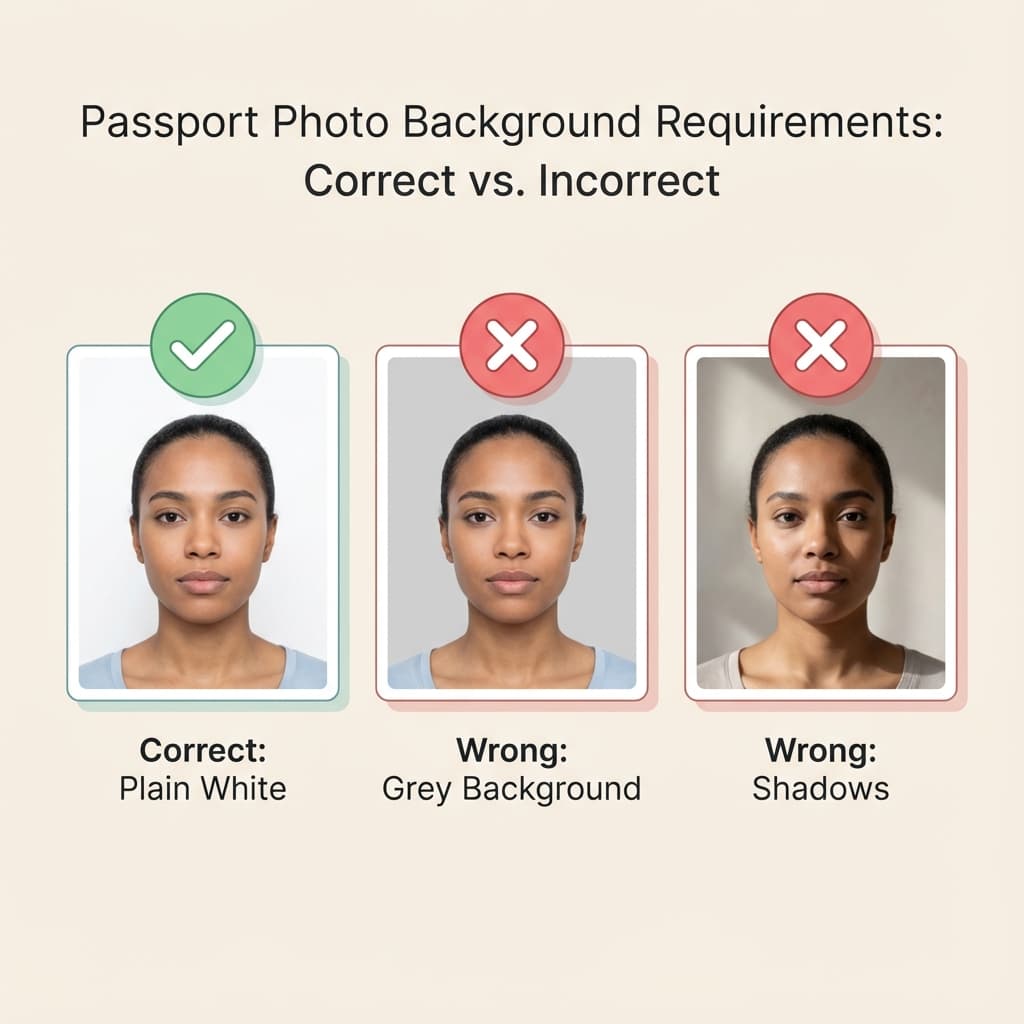
Acceptable
- ✅ Pure white
- ✅ Light off-white
- ✅ Uniform color, no variations
- ✅ Free from shadows
Not Acceptable
- ❌ Blue, red, or any color
- ❌ Patterned or textured
- ❌ Gradients or uneven
- ❌ Visible shadows
Requirements by Country
Background rules are not identical worldwide. India generally expects white or off-white, while some other countries use different colors. If you are preparing a visa or passport for another destination, check the country-specific requirement before you shoot the photo.
| Country | Background |
|---|---|
| India | White/Off-white |
| USA | White only |
| UK | Light grey or cream |
| Indonesia | Red |
| Malaysia | Light blue |
DIY Background Setup
You do not need a studio to make a good background. A simple home setup can work well if the wall is smooth and the light is controlled. The trick is to reduce clutter, reflections, and shadows before you take the shot.
Option 1: White Wall
- Find a clean, flat white wall
- Check for marks or shadows
- Stand 2-3 feet away to reduce shadow edges
Option 2: White Bedsheet
- Iron to remove wrinkles
- Hang flat against wall
- Ensure no folds visible
Option 3: Digital Removal
Use PassportSizePhoto.in to automatically remove any background and replace with perfect white.
| Setup | Best use case |
|---|---|
| White wall | Fastest option when the room is already bright and clean |
| White bedsheet | Useful when the wall is not pure white |
| Digital background fix | Helpful when the background has color or clutter |
Lighting for White Background
Lighting decides whether a white background actually looks white. If the light is too weak, the wall turns grey. If the light is uneven, one side becomes brighter than the other. Your goal is even illumination, not dramatic lighting.
Common Problems
- Grey background: Not enough light
- Yellow tint: Indoor tungsten lighting
- Shadows: Standing too close
Solutions
- Use natural daylight when possible
- Stand 3-4 feet from background
- Light the background separately
If you are shooting indoors, try facing a window or using two balanced light sources. One light alone often creates a bright face and a dull wall, which makes the photo feel uneven even when the background is technically white.
Common Mistakes
Background mistakes are easy to miss when you are taking the photo yourself, because the camera preview can hide small problems. Always zoom in and check for the edge of the subject, wall shadows, and any visible texture before final export.
- Visible shadows: Stand further from background
- Wrinkled sheet: Iron thoroughly
- Color cast: Use natural daylight
- Objects visible: Use digital background removal
How to Test the Background at Home
The simplest test is to take one photo, then open it on a larger screen and look at the empty space around the head and shoulders. If you can see color patches, gradients, or a shadow line, the background probably needs another round of lighting adjustment.
You can also step back and look at the room from the camera angle. Many background problems are created by things that are easy to ignore in person, such as a slightly stained wall, a curtain edge, a mirror reflection, or a darker corner behind the subject. Removing those distractions before the shoot usually gives a cleaner result than trying to fix the background later.
| Test | What a good result looks like |
|---|---|
| Large-screen review | No visible color patches or dark bands |
| Edge check | Subject is clearly separated from the wall |
| Shadow check | No hard shadow behind the head or shoulders |
| Clutter check | No objects, wires, or furniture in frame |
How to Fix a Bad Background
| Problem | Practical fix |
|---|---|
| Grey wall | Add more front light and brighten the room |
| Shadow behind head | Move farther from the wall and avoid one-sided lighting |
| Wrinkles in sheet | Iron or replace with a smoother backdrop |
| Busy room background | Use background removal or move to a simpler wall |
For a cleaner result, combine a simple wall with soft daylight and a little distance between the person and the wall. That small setup change solves most background problems without any heavy editing.
A final note: off-white is sometimes accepted because cameras and screens can shift the look of a white surface slightly. Even so, the cleanest and brightest background you can reasonably create is the best choice. It gives you more margin for the portal or reviewer to accept the image without hesitation.
Why the Background Matters So Much
The background is not just decoration. It helps the review process isolate the face quickly and clearly. When the background is busy, dark, or uneven, the eye is pulled away from the person and into the room behind them. That makes the photo feel less official and increases the chance of a rejection or a second look.
A plain white background also makes the rest of the photo easier to evaluate. Skin tone, head position, and face outline become more obvious, which is why simple backgrounds are so common in document rules. If you are trying to improve a passport photo at home, the background is one of the easiest things to fix well.
When you are deciding between a quick shot and a careful setup, spend the extra minute on the background. It is usually the part that can be improved the most with the least effort. A cleaner wall, a better distance from the subject, and softer light can turn a borderline image into one that feels much more compliant and professional.
You can also compare this topic with background requirements and lighting tips if you want to improve the whole photo, not just the wall color.
Frequently Asked Questions
What background color is required for Indian passport photos?
Plain white or off-white background is required for Indian passport photos. The background must be uniform without patterns, shadows, or textures.
Is off-white acceptable for passport photos?
Light off-white is generally acceptable for Indian passports, but pure white is preferred and recommended. Very cream or beige backgrounds may be rejected.
Can I use blue background for Indian passport?
No, blue backgrounds are not accepted for Indian passports. India specifically requires white or off-white backgrounds. Some other countries like Malaysia require blue.
How to create white background at home?
Use a clean white wall, hang a white bedsheet, or use white poster board. Stand 2-3 feet away to avoid shadows. Ensure even lighting across the background.
Why is my white wall appearing grey in photos?
This happens due to insufficient lighting. Add more light to the background or use our tool which automatically removes and replaces backgrounds with perfect white.
What if my background has shadows?
Shadows on the background will cause rejection. Stand further from the wall (2-3 feet), add more frontal lighting, or use digital background removal tools.
Can I digitally change my background to white?
Yes! PassportSizePhoto.in automatically removes any background and replaces it with perfect white. This is the easiest solution for home photos.
What background color for US visa photos?
US visas require pure white backgrounds only. Off-white or cream are not acceptable for DS-160 applications.
Are textured backgrounds allowed?
No, textured or patterned backgrounds are not allowed for any passport or visa photo. The background must be completely plain and uniform.
What if I have colorful curtains behind me?
Colorful or patterned curtains will not work for passport photos. Either change location, cover with white sheet, or use automatic background removal.
Is pure white always better than off-white?
Pure white is usually the safest option, but light off-white can still work for some passport rules. When in doubt, choose the cleanest and brightest background you can make.
Can shadows be edited out later?
Sometimes they can, but it is better to avoid them during capture. A naturally clean background looks more reliable than a heavily edited one.
Why does my background look uneven in the preview?
This often happens when the lighting is hitting one side more strongly than the other. Move the subject farther from the wall and balance the light.
Next practical step
After reading the guide, open the matching tool or reference page so capture, crop, upload, and print prep stay in the right order.
Create Your Passport Photo
Make a 35x45mm photo, download a digital file, or create a print-ready sheet.
Create Photo Free →