Passport Photo for Senior Citizens
Complete guide to taking passport photos for elderly and senior citizens. Helpful tips, addressing common challenges, and making the process comfortable for seniors.
Understanding Passport Photos for Seniors
Taking passport photos for elderly family members comes with unique considerations. While the technical requirements are the same as for any adult, seniors may face challenges related to mobility, vision, or physical limitations.
This guide provides practical tips to make the passport photo process comfortable and successful for senior citizens, whether you are taking photos at home or visiting a studio.
The most important thing to remember is that age does not change the photo rules, but it does change the process. A senior may need more time to settle into position, may be sensitive to bright lights, or may need help staying comfortable during the session. Planning for that in advance makes the whole experience smoother.
If the applicant has a medical condition, limited neck movement, reduced vision, tremors, or uses mobility support, the best photo is the one that still shows the face clearly without making the person feel rushed. Comfort and compliance can work together when the setup is handled carefully.
Key Reminder
Patience is essential when photographing seniors. Allow extra time, take breaks as needed, and capture multiple shots to choose the best one.
Standard Requirements Apply
Senior citizens must meet the same passport photo requirements as all adults:
That means the person should be facing the camera, the background should be plain white, and the image should look recent and natural. The rules do not become looser just because someone is older, so the safest approach is to match the standard format closely and only make comfort-related adjustments during the capture process.
| Requirement | Specification |
|---|---|
| Size | 2×2 inches (2×2 inch square) |
| Background | Plain white |
| Expression | Neutral, mouth closed |
| Eyes | Open and visible |
| Head Position | Straight, looking at camera |
| Photo Age | Within 6 months |
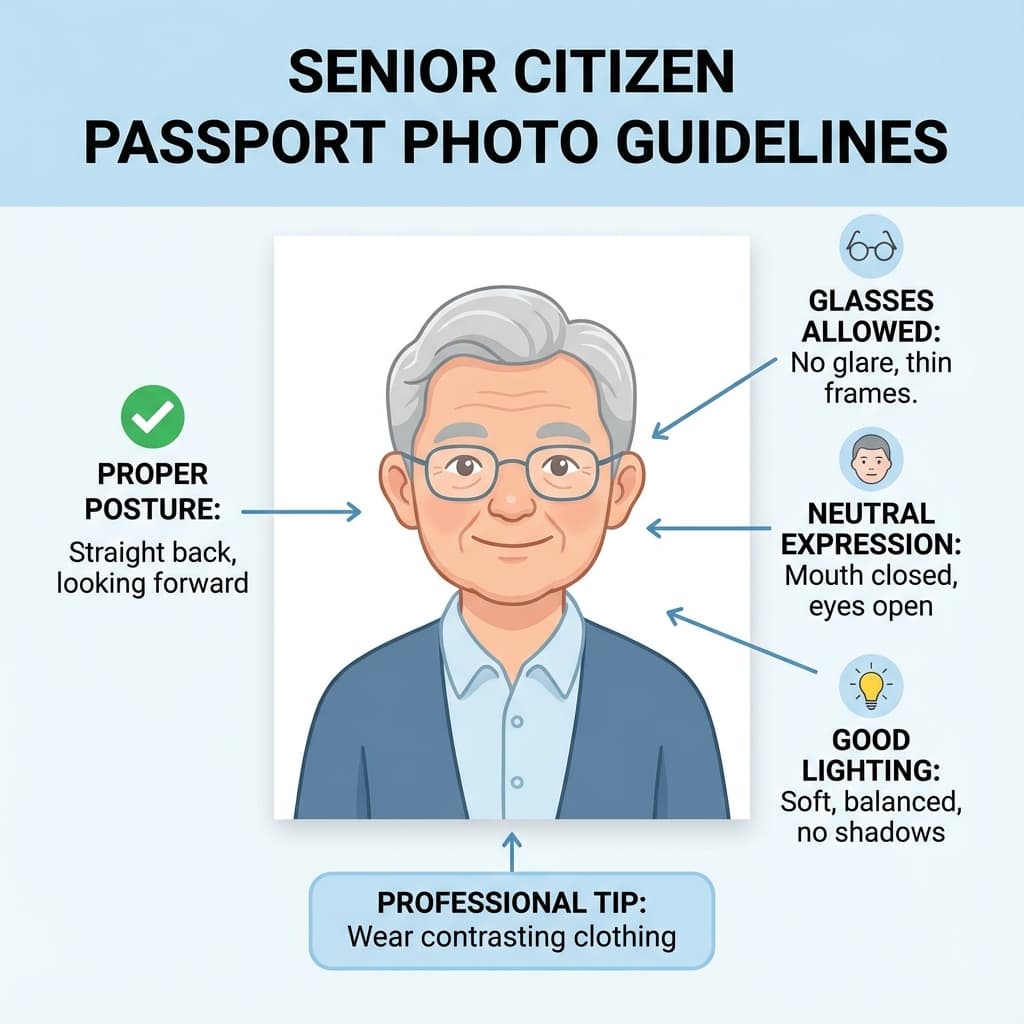
A photo that is technically correct but poorly lit or awkwardly framed can still cause trouble later. Seniors often look best when the lighting is soft, the chair is comfortable, and the camera is placed at eye level so the person does not have to strain the neck or chin.
Common Challenges for Seniors
Many of the problems that affect senior passport photos are practical rather than technical. The person may tire easily, blink more often, or need a slower pace to feel comfortable. That is why the best sessions are calm, well prepared, and built around short attempts instead of one long take.
Vision Related
- • Eyes watering under lights
- • Difficulty keeping eyes open
- • Squinting due to brightness
- • Glare on glasses
Mobility Related
- • Difficulty sitting upright
- • Head tremors or involuntary movement
- • Need for wheelchair or support
- • Fatigue during long sessions
These issues are normal and manageable. For example, glare can often be fixed by moving the light source or changing the glasses angle. Fatigue can be handled by taking a break between shots. Small mobility limitations can usually be solved by adjusting the chair and camera height.
Helpful Tips for Senior Photos
Good senior photos usually come from preparation. Have the background ready first, make sure the camera is charged, and choose a time when the person feels rested. The calmer the environment, the more natural the expression will look.
Preparation Tips
- ✅ Choose a comfortable time: When the senior is most alert and rested
- ✅ Use a supportive chair: A chair with back support for stability
- ✅ Prepare calming environment: Quiet, comfortable temperature
- ✅ Have water nearby: Staying hydrated helps skin look better
- ✅ Allow rest breaks: Do not rush, take breaks between attempts
A gentle approach is often more effective than trying to force the posture. If the applicant can sit naturally and look at the camera without strain, the photo will usually look better and feel less stressful. Short, clear instructions work better than long explanations.
During the Photo
- ✅ Use natural light: Softer and less harsh than studio lights
- ✅ Take many photos: At least 10-15 to choose from
- ✅ Use timer/remote: Avoids camera shake
- ✅ Keep talking: Light conversation helps relax facial muscles
- ✅ Give clear instructions: Simple, one-step directions
If the first few shots are not ideal, do not treat that as a failure. Seniors often settle in after the session starts. A warm conversation, a brief pause, or a small adjustment to the seat often turns an average photo into a usable one.
Taking Photos at Home
For seniors who cannot easily travel to a photo studio, taking photos at home is a practical alternative:
Home photos work especially well when the applicant feels more relaxed in a familiar space. You can control the lighting, set up a comfortable chair, and take your time without the pressure of a waiting room or a busy studio.
- 1. Set up background: Hang a white bedsheet on a wall, ensuring no wrinkles
- 2. Position chair: Place a comfortable chair 1-2 feet from the background
- 3. Arrange lighting: Position near a large window for natural light, face lit evenly
- 4. Camera position: Camera at eye level, 4-6 feet away from the senior
- 5. Take photos: Multiple shots, checking each one for eye position and focus
- 6. Process photo: Use PassportSizePhoto.in for correct sizing
The background should be plain and uncluttered. If the chair, wall, or curtain creates a color cast or visible pattern, move the setup a little farther from the wall or replace the fabric with something smoother and brighter. Even a small adjustment can make the image look cleaner.
Glasses Guidelines for Seniors
Many seniors wear glasses regularly. Here is what to know:
Glasses are one of the most common reasons a senior photo needs a retake. The lens may reflect the room light, the frames may sit too low on the nose, or the glasses may make the eyes harder to see. A careful lighting setup helps a lot, but sometimes removing the glasses for the photo is still the simplest option.
For Indian Passport
- ✅ Clear prescription glasses are allowed
- ✅ Anti-reflective coating helps prevent glare
- ❌ Tinted or photochromic lenses not allowed
- ❌ Glare covering eyes will cause rejection
Tip: Tilt the glasses slightly or adjust the light angle to eliminate reflections. If glare persists, consider removing glasses for the photo.
If the senior always wears glasses and feels uncomfortable without them, take a few test shots first. Sometimes a tiny movement of the chin or a softer light source is enough to keep the glasses on while still showing the eyes clearly.
Wheelchair Users
Seniors in wheelchairs can take valid passport photos with proper setup:
The key is to frame the person, not the wheelchair. The chair should be a support tool, not the focus of the image. With the right angle and crop, a wheelchair user can produce a perfectly acceptable passport photo at home or in a studio.
Tips for Wheelchair Users
- • Position wheelchair close to background so chair is not visible
- • Frame photo to show only head and shoulders
- • Remove any headrests that might appear in frame
- • Use pillows for additional support if needed (not visible in photo)
- • Helper can steady the person from outside the frame
If the person cannot sit perfectly upright for long, take the photo in a comfortable position and correct only the framing, not the person's natural appearance. The important part is that the face is centered, clear, and free from obstructions.
Application Options for Seniors
Senior applicants often do best when the application path is chosen with convenience in mind. Some people are comfortable handling much of the process online, while others prefer in-person help at the Passport Seva Kendra. Both options can work well if the photo is prepared correctly first.
Online Application
- ✅ Can complete most steps at home
- ✅ Reduced PSK visit time
- ✅ Take photos at your convenience
- ⚠️ Still requires PSK visit for biometrics
PSK Benefits for Seniors
- ✅ Priority counter for 60+ age group
- ✅ Wheelchair accessibility
- ✅ Assistance from staff
- ✅ On-site photo facility
If mobility is a concern, it can help to prepare the photo at home before the appointment so the in-person visit is shorter and less tiring. Even when an on-site photo facility is available, coming prepared with a clean, compliant image gives you a backup and reduces stress.
Frequently Asked Questions
Are passport photo requirements different for senior citizens?
No, the same specifications apply to all ages: 2x2 inch size, white background, neutral expression, and a recent photo within 6 months. There are no relaxed requirements based on age.
What if the senior cannot hold their head straight due to medical conditions?
In cases of genuine medical conditions that prevent standard positioning, carry medical documentation to the Passport Seva Kendra. Officials may make accommodations, but try to get as close to standard positioning as possible.
Can seniors wear glasses in passport photos?
Yes, clear prescription glasses without tinted lenses are allowed for Indian passports. Ensure there is no glare on the lenses covering the eyes. For US visa applications, glasses must be removed.
What if the senior has difficulty keeping eyes open?
Take multiple photos to capture one with eyes fully open. Rest between attempts if eyes get tired. Ensure lighting is not too bright, which can cause squinting. Eye drops can help if eyes are dry.
Can a wheelchair or support be visible in the photo?
No, the senior must appear alone in the photo with no visible support, wheelchair, or helper. Use clever positioning so the person appears to be standing/sitting independently against the white background.
Is there special assistance for seniors at PSK?
Yes, Passport Seva Kendras offer priority processing for senior citizens aged 60 and above. They often have dedicated counters and shorter wait times. Tatkaal appointments are also prioritized for seniors.
What if the senior cannot travel to a photo studio?
Take photos at home using a smartphone and our free tool. Set up a white background (bedsheet or wall), ensure good lighting, and have the senior sit comfortably in a chair. Many studios also offer home visits.
How recent must the photo be for senior passport renewal?
The photo must be taken within 6 months of the application date, regardless of age. Even if appearance has not changed significantly, an old photo will be rejected. Always use a fresh photo.
Can someone else apply for passport on behalf of a bedridden senior?
For seriously ill or disabled applicants, a representative can apply at the PSK with medical certificates. The applicant may need to be present for biometrics unless exempted by the officer based on medical grounds.
What if the senior has facial palsy or asymmetric features?
Medical conditions affecting facial appearance are acceptable. The photo should show the person natural appearance. No editing to correct or hide medical conditions is needed or recommended.
What is the most comfortable way to photograph a senior at home?
Use a sturdy chair, natural light from a window, and a calm pace. Keep the camera at eye level, avoid harsh flash, and take breaks whenever the person needs one.
Should older photos be reused if the face looks the same?
No. Passport photos still need to be recent, so it is safer to take a fresh photo rather than rely on an older image, even if the appearance has changed very little.
What if the senior blinks a lot?
Take many images in a row and let the person rest between attempts. Softer lighting and a relaxed session usually reduce blinking and squinting.
Create Senior Photo at Home
Take a comfortable photo at home and process it free with our tool.
Create Free Photo →Next practical step
After reading the guide, open the matching tool or reference page so capture, crop, upload, and print prep stay in the right order.
Create Your Passport Photo
Make a 35x45mm photo, download a digital file, or create a print-ready sheet.
Create Photo Free →