Why Passport Photos Get Rejected: Top 10 Reasons & Fixes
Your passport photo was rejected? Learn common rejection reasons, practical fixes, and checks that reduce repeat photo issues.
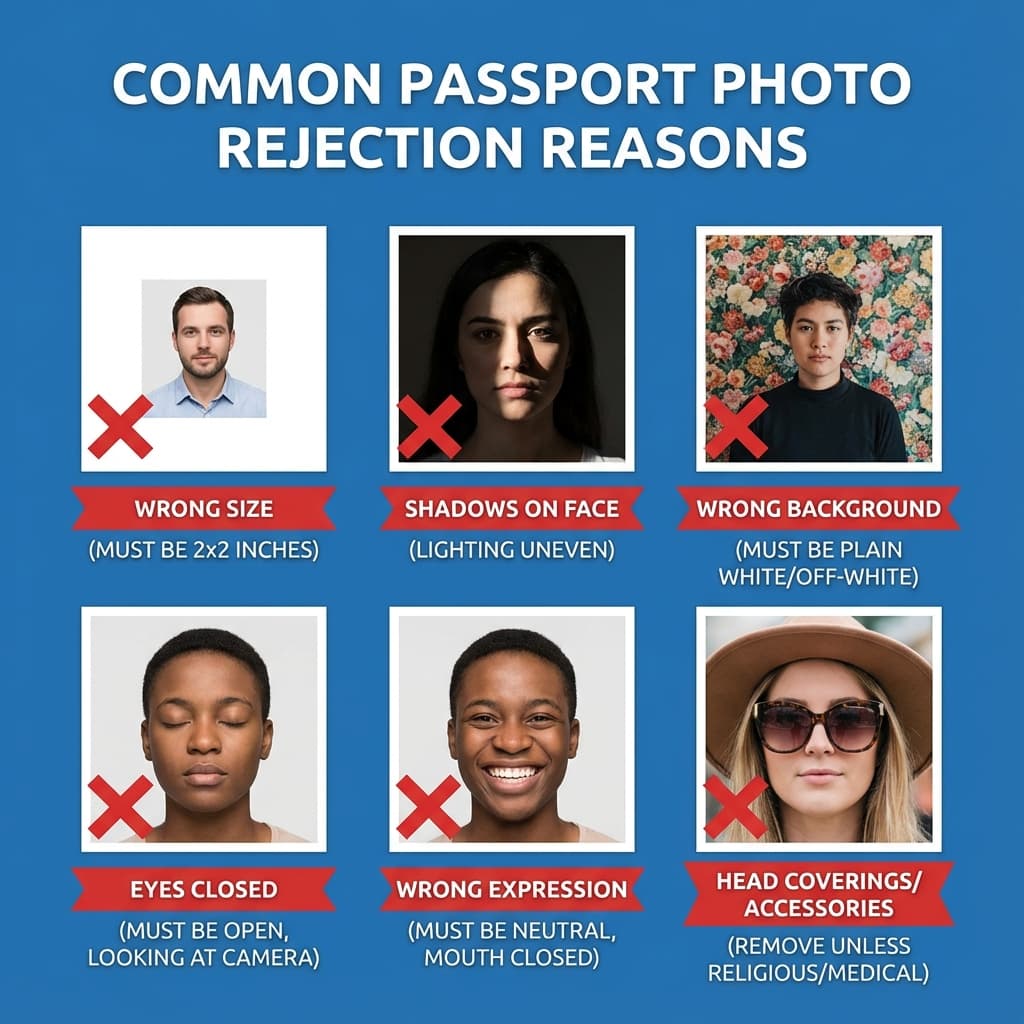
Why Do Passport Photos Get Rejected?
Every year, thousands of Indian passport applications face delays due to photo rejections. The Indian passport office follows strict guidelines set by the International Civil Aviation Organization (ICAO) for biometric photo standards.
Whether you're applying through the Passport Seva portal online or visiting a Passport Seva Kendra (PSK), your photo must meet specific technical requirements. Even minor deviations can trigger automatic rejection by the document processing systems.
Why It Matters
Photo-related issues are among the most common reasons for passport application delays. Understanding rejection reasons beforehand can save you weeks of delay and additional trips to the passport office.
Top 10 Passport Photo Rejection Reasons
Based on data from passport processing centers and user feedback, here are the most common reasons for photo rejection, ranked by frequency:
Wrong Background Color
Most CommonThe most common rejection reason. Indian passport photos require a plain white or off-white background.
Why rejected: Non-uniform backgrounds interfere with facial recognition systems and document scanning.
How to fix: Use a white wall or sheet. Our AI tool automatically removes and replaces backgrounds with pure white.
Incorrect Photo Size
Very CommonPhoto dimensions not matching the required 35×45mm India passport photo specification.
Why rejected: Standard document slots require exact measurements for proper placement.
How to fix: Use PassportSizePhoto.in to crop and resize to the 35×45mm portrait format before upload or print.
Shadows on Face or Background
Very CommonVisible shadows on the face, neck, or behind the subject.
Why rejected: Shadows can obscure facial features needed for identification and biometric matching.
How to fix: Take photos facing a window with natural light. Avoid overhead lighting that creates harsh shadows.
Glasses with Glare or Heavy Frames
CommonEyeglasses creating reflections or frames covering the eyes.
Why rejected: Eyes must be clearly visible for identity verification. Glare hides eye details.
How to fix: Remove glasses for the photo. If wearing glasses is mandatory, tilt head slightly to avoid glare.
Wrong Facial Expression
CommonSmiling, frowning, or any expression other than neutral with closed mouth.
Why rejected: Biometric systems require neutral expressions for accurate facial feature mapping.
How to fix: Keep a relaxed, neutral expression. Mouth closed, eyes open naturally.
Eyes Not Fully Open or Red-Eye
CommonClosed eyes, half-closed eyes, or flash-induced red-eye effect.
Why rejected: Eyes are crucial identifiers. Closed or red eyes make identification difficult.
How to fix: Take multiple shots and choose the best one. Avoid direct flash; use diffused lighting.
Head Position Issues
Less CommonHead tilted, turned to side, or not centered in the frame.
Why rejected: Face must be directly facing the camera for proper biometric capture.
How to fix: Look directly at the camera. Keep face centered and aligned straight.
Photo Too Old
Less CommonPhoto taken more than 6 months before the application date.
Why rejected: Your current appearance must match the photo for identity verification at immigration.
How to fix: Always use a recent photo taken within the last 3 months for best results.
Digital File Size Issues
Less CommonFor online applications: file too large (>300KB) or too small (<10KB).
Why rejected: Portal systems have strict file size requirements for upload and storage.
How to fix: Compress your photo to 50-200 KB. Our tool automatically optimizes file size.
Over-Editing or Filters
RareBeauty filters, heavy retouching, or artificial enhancements applied.
Why rejected: Photo must represent your natural appearance. Filters alter facial features.
How to fix: Use only basic adjustments: brightness, contrast. Never use beauty or smoothing filters.
Common Issues Users Face
Here are some common scenarios that lead to passport photo rejections:
Background shadows
Many users find that their home lighting creates unexpected shadows on what appears to be a white wall.
Solution: Use PassportSizePhoto.in to remove the background completely.
Glasses glare
Prescription glasses often cause reflections that cover part of the eyes.
Solution: Remove glasses for the photo since wearing them is no longer mandatory for most documents.
File size issues
High-resolution camera photos often exceed the file size limits for online portals.
Solution: Use a photo tool that automatically optimizes file size to meet portal requirements.
The True Cost of Photo Rejection
A rejected passport photo isn't just an inconvenience—it comes with real costs:
Time Delay
1-3 Weeks
Added to processing time
Extra Cost
₹100-500
Travel & new photo costs
Stress
High
Especially for urgent travel
Impact on Urgent Travel
If you have urgent travel plans, photo rejection can mean missing flights, losing hotel bookings, or canceling important trips. Submit the cleanest photo you can before the first review.
How to Avoid Photo Rejection
Follow these checks to reduce the most common photo rejection issues before submission:
Acceptance Checklist
- Use pure white background – No patterns, shadows, or textures
- Exact 35×45mm size – Use a purpose-built tool for precise dimensions
- Face the camera directly – No tilting or turning of head
- Neutral expression – Mouth closed, natural look
- Eyes clearly visible – Remove glasses if possible
- Even lighting – No shadows on face or background
- Recent photo – Taken within last 3-6 months
- Correct file size – 50-200 KB for online submissions
Pro Tip: Use an Automated Tool
PassportSizePhoto.in helps clean the background, adjust dimensions, and optimize file size so you can avoid common rejection triggers.
Create Passport Photo Free →How to Resubmit Your Photo
If your photo was rejected, here's how to fix it and resubmit:
Step 1: Understand the Rejection
Check your email or Passport Seva account for the specific rejection reason. This tells you exactly what needs to be fixed.
Step 2: Take or Edit Your Photo
If the issue is with background or size, you can edit the existing photo. For expression, lighting, or positioning issues, take a new photo.
Step 3: Validate Before Submitting
Use PassportSizePhoto.in to check your new photo meets all requirements before uploading.
Step 4: Resubmit Online
Log in to Passport Seva, navigate to your application, and upload the new photo.
Frequently Asked Questions
What happens if my passport photo is rejected?
You will receive a rejection notification with the reason. You must submit a new photo that meets requirements. This typically delays your application by 1-2 weeks and may require an additional visit to the passport office.
How many times can I resubmit my passport photo?
There is no official limit on resubmissions. However, each rejection adds delays to your application. Using a careful checklist and a purpose-built photo tool helps reduce avoidable mistakes.
Can I edit my rejected photo and resubmit it?
It depends on the rejection reason. If rejected for background issues, you can edit and resubmit. If rejected for expression, head position, or lighting, you need to take a new photo.
How long does resubmission take?
Online resubmission is processed within 24-48 hours. If you need to visit a Passport Seva Kendra, you may need to book a new appointment, adding 1-2 weeks to the process.
Is there a fee for photo resubmission?
Online resubmission through the Passport Seva portal is free. However, if your application is rejected multiple times, you may need to pay for a new appointment slot.
Why was my photo rejected even though it looks fine?
Many rejection reasons aren't visible to the naked eye: slight shadows, minor background imperfections, or incorrect dimensions. Automated systems are very sensitive to these issues.
Can I appeal a photo rejection?
There is no formal appeal process for photo rejections. The fastest solution is to submit a new photo that meets all requirements.
How do I know if my photo will be accepted before submitting?
Use PassportSizePhoto.in which validates your photo against official requirements before you submit. This helps you identify and fix issues proactively.
Are studio photos less likely to be rejected?
Not necessarily. Many studio photos are also rejected because photographers may not follow the latest guidelines. Using a digital tool ensures compliance with current requirements.
What if my baby's passport photo is rejected?
Baby photos have special leniency for expressions but still need white backgrounds and proper lighting. Common rejections include visible parent hands or non-white backgrounds. Visit our baby passport photo guide for specific tips.
Avoid Rejection – Create Your Photo Now
Use the photo maker to crop, resize, clean the background, and export a better passport photo file.
Create Free Passport Photo →Next practical step
After reading the guide, open the matching tool or reference page so capture, crop, upload, and print prep stay in the right order.
Create Your Passport Photo
Make a 35x45mm photo, download a digital file, or create a print-ready sheet.
Create Photo Free →